EDIT: Thanks for all the help. Nothing has worked and I still have the same issue. I give up – I’m just going to return the game and try again with another copy whever they’re available in stores again.
***
I have an early model Switch (one of the ones that can still be hacked) and the OG dock, and when I start playing Prime Remastered, I get around 10 fps on average.
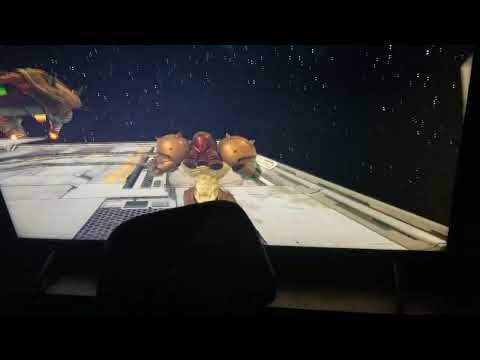
I waited for the physical release – managed to find a copy in the wild and this is what I’m met with when I finally sit down to play. All gameplay is in slow motion. The menus and the opening cutscene run fine, but when the camera does the transition into Samus’ viewpoint it starts to slow down and results in the molasses-slow mess you can see in the video above.
I’ve rebooted the system, unplugged and replugged all cables, and removed the game cart numerous times and no order of nonsense fixes it.
When I boot up another game (Turok, Doom 64, MK8) they run perfectly fine. And the really annoying thing is when I remove the Switch from the Dock and play in handheld mode it runs just fine. It is only in docked mode that it exhibits this slowdown.
I’m playing with a first party Pro controller too BTW (fully updated) so its not some weird third-party compatibility issue either. No motion smoothing or reality enhancement type post-processing effects are on in the TV settings and no other game is experiencing the slow down…
My question is – has anyone else experienced this? Is there a fix or am I just shit out of luck until Ninty pushes the next patch?
sofaslippers
That’s weird. Haven’t experienced that and I still have a launch Switch.
apachkowsky
Weird I have a day 1 switch/dock and have been playing the game exclusively docked and no issues. I do have the game digitally though
BurtRaspberry
You’re in Outer Space… what did you expect?! 😉
IDontCheckMyMail
Day 1 switch here. Zero issues.
isekai-coffee
is your switch physically hot? seems like throttling
LoekGenbu
Check to make sure its not hot and maybe blow out some dust.
Deceptiveideas
The switch when docked runs at higher clock speeds and thus runs warmer.
I’m curious if the reason why you’re facing the issues when docked is not because of the Switch model itself, but a failing part (such as the fan) or dust blockage causing improper cooling. It probably wouldn’t be a bad idea to clean out the machine, I can’t imagine how clogged up it is after all these years.
stuartdenum
is it just samus that is slow motion or do other game elements like enemies and doors also run slow?
meruta
It’s the frame rate. This games speed is tied to frame rate. I got the same behavior when I manually underclock the GPU on my Switch while playing this game
jontomy
It definitely sounds like it’s throttling, clock speeds (probably GPU) not hitting the docked targets. I tried to run docked mode with handheld clocks and got exact same experience. Your GPU probably stays at 300-400 MHz which is why you have no issues in handheld mode. Also most other games either use dynamic resolution (like MK8) to hit their framerate target or at least don’t have in-game speed tied to framerate so it wouldn’t be as noticeable. Or they’re not demanding enough to suffer performance drops at all in the first place (Turok).
If you have an early Switch you could try to install custom firmware and see what’s going on with your temperatures and clock speeds (probably could override values too).
But to actually fix the throttling your best bet would be to open the Switch up and clean the fan and change the thermal paste. Also if your fan never turns on at all it may be faulty and that’s the reason clocks stay low, so you’d have to replace it.
Hestu951
You cross-posted this from r/Metroid. I’ll give you the same answer I did there:
​
> You have a weird problem somewhere, but I suspect it’s not the Switch, because the slo-mo is too consistent. If the system was overheating, it would shut down, perhaps glitching or stuttering beforehand. It wouldn’t give you long-term half-speed like that. Some have suggested TV-smoothing settings [are to blame]. Since I don’t have a TV with that, I can’t say. But it may be worth investigating in your case.
wyattsup
I’ve seen this happen before with some of the older switches. You can google it and find people with the same issue back in 2017. Unfortunately I can’t find a solution. It’s as if the console is not ramping up the GPU clock for whatever reason. Maybe something faulty that only shows itself with this game or some quirk going on when switching to docked mode. If possible, do you know anyone else who owns a Switch? Cause it would be helpful to test the game in another Switch and Dock to rule things out.
EDDIE_BR0CK
Have you tried reaching out to Nintendo support?
I’ve had good success contacting them about repairing joycons out of warranty, which they did free of charge.
15 Comments
EDIT: Thanks for all the help. Nothing has worked and I still have the same issue. I give up – I’m just going to return the game and try again with another copy whever they’re available in stores again.
***
I have an early model Switch (one of the ones that can still be hacked) and the OG dock, and when I start playing Prime Remastered, I get around 10 fps on average.
I waited for the physical release – managed to find a copy in the wild and this is what I’m met with when I finally sit down to play. All gameplay is in slow motion. The menus and the opening cutscene run fine, but when the camera does the transition into Samus’ viewpoint it starts to slow down and results in the molasses-slow mess you can see in the video above.
I’ve rebooted the system, unplugged and replugged all cables, and removed the game cart numerous times and no order of nonsense fixes it.
When I boot up another game (Turok, Doom 64, MK8) they run perfectly fine. And the really annoying thing is when I remove the Switch from the Dock and play in handheld mode it runs just fine. It is only in docked mode that it exhibits this slowdown.
I’m playing with a first party Pro controller too BTW (fully updated) so its not some weird third-party compatibility issue either. No motion smoothing or reality enhancement type post-processing effects are on in the TV settings and no other game is experiencing the slow down…
My question is – has anyone else experienced this? Is there a fix or am I just shit out of luck until Ninty pushes the next patch?
That’s weird. Haven’t experienced that and I still have a launch Switch.
Weird I have a day 1 switch/dock and have been playing the game exclusively docked and no issues. I do have the game digitally though
You’re in Outer Space… what did you expect?! 😉
Day 1 switch here. Zero issues.
is your switch physically hot? seems like throttling
Check to make sure its not hot and maybe blow out some dust.
The switch when docked runs at higher clock speeds and thus runs warmer.
I’m curious if the reason why you’re facing the issues when docked is not because of the Switch model itself, but a failing part (such as the fan) or dust blockage causing improper cooling. It probably wouldn’t be a bad idea to clean out the machine, I can’t imagine how clogged up it is after all these years.
is it just samus that is slow motion or do other game elements like enemies and doors also run slow?
It’s the frame rate. This games speed is tied to frame rate. I got the same behavior when I manually underclock the GPU on my Switch while playing this game
It definitely sounds like it’s throttling, clock speeds (probably GPU) not hitting the docked targets. I tried to run docked mode with handheld clocks and got exact same experience. Your GPU probably stays at 300-400 MHz which is why you have no issues in handheld mode. Also most other games either use dynamic resolution (like MK8) to hit their framerate target or at least don’t have in-game speed tied to framerate so it wouldn’t be as noticeable. Or they’re not demanding enough to suffer performance drops at all in the first place (Turok).
If you have an early Switch you could try to install custom firmware and see what’s going on with your temperatures and clock speeds (probably could override values too).
But to actually fix the throttling your best bet would be to open the Switch up and clean the fan and change the thermal paste. Also if your fan never turns on at all it may be faulty and that’s the reason clocks stay low, so you’d have to replace it.
You cross-posted this from r/Metroid. I’ll give you the same answer I did there:
​
> You have a weird problem somewhere, but I suspect it’s not the Switch, because the slo-mo is too consistent. If the system was overheating, it would shut down, perhaps glitching or stuttering beforehand. It wouldn’t give you long-term half-speed like that. Some have suggested TV-smoothing settings [are to blame]. Since I don’t have a TV with that, I can’t say. But it may be worth investigating in your case.
I’ve seen this happen before with some of the older switches. You can google it and find people with the same issue back in 2017. Unfortunately I can’t find a solution. It’s as if the console is not ramping up the GPU clock for whatever reason. Maybe something faulty that only shows itself with this game or some quirk going on when switching to docked mode. If possible, do you know anyone else who owns a Switch? Cause it would be helpful to test the game in another Switch and Dock to rule things out.
Have you tried reaching out to Nintendo support?
I’ve had good success contacting them about repairing joycons out of warranty, which they did free of charge.
ssssssssppppppppaaaaaaaaacccccccccceeeeeee juuuuuuuuuuuumpppppp