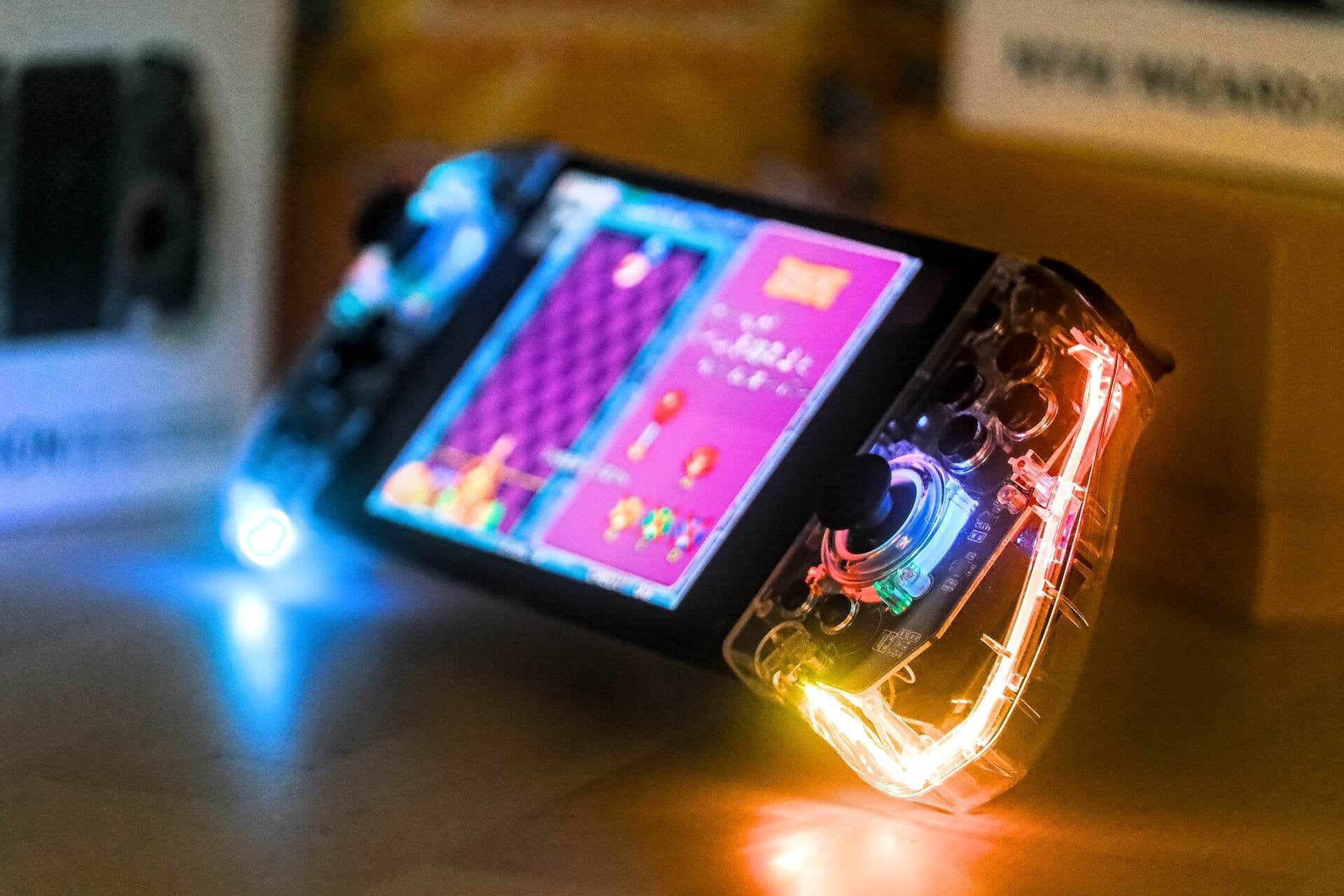
TLDR: The Nyxi controller looks great on paper, but its unreliable performance overshadows its potential. Consider the Nyxi Wizard for a premium option instead or the Hori Split Pad Pro for a basic joy-pad.
Photos: [https://imgur.com/a/8cehrrK](https://imgur.com/a/8cehrrK)
​
Disclaimer: Received Nyxi controller for review. These thoughts are my own. I’m going focus on handheld gameplay in this review, not gonna get into all the technical stuff like programmable backpaddles and turbo features of the Hyperion. While I have a decent collection of controllers for various consoles, a totally transparent one is a first for me. I’m still hopeful for a Nyxi Wizard controller with a transparent finish (PLZZZ) and an official Nintendo Switch product line in a similar style.
​
Ergonomics? TLDR: Good.
Nyxi Hyperion is a beast in this category, featuring mappable backpaddles — a popular feature in third-party Nintendo Switch controllers. The controller is made of sleek hard plastic, it offers a comfortable grip for gamers with medium to large hands. While those with smaller hands might still find it suitable, I’d recommend a test in-store before purchase. The slightly rounded handles on the Hyperion joy-pads provide a more ergonomic hold compared to the Hori Split Pad Pro and official Nintendo Switch joy-cons.
​
D-PAD? TLDR: Alright.
With matte black plastic finish, I’d characterize it as ‘utilitarian.’ It’s plenty responsive and feels alright in use. It miles better than the D-PAD on official Switch Joy-Cons and more comfortable to use than the D-PAD on the Nyxi Wizard. However it falls short in comparison to the D-PAD on 8BitDo SN30 Pro, which is one of the best D-PADs for the Nintendo Switch.
​
ABXY buttons? TLDR: Good.
The Hyperion buttons use membrane switches, requiring a force of 160g to press. This is stiff enough to be enjoyable while being light enough to spam ’em if needed. In terms of design, the ABXY buttons are crafted from very posh transparent plastic. However, a notable drawback is the absence of backlighting for any of the buttons. The NYXI Hyperion is all about bling. Why not go all out with the backlit light circus? In comparison the Razer Sabertooth controller managed backlit mechanical buttons in 2013.
​
Reliability? TLDR: Needs improvement.
The Nyxi Hyperion controller, while a great concept, has a significant flaw. In handheld mode, it frequently loses connection with the Nintendo Switch, occurring unpredictably. This ranges from once per hour to an exasperating 20+ times in 2 minutes, making it highly unreliable. These interruptions are not only annoying but progressively infuriating, especially in demanding games. In multiplayer, a sudden pause disrupts the gameplay flow, and you would have to reconnect by pressing L1 & R1. Due to these issues, I hesitate to endorse the Nyxi Hyperion. Additionally, it consistently forgets selected color schemes, further diminishing its appeal.
​
Battery? TLDR: Alright.
Nyxi Hyperion also functions as a wireless controller with a 500 mAh battery for 6.5 hours of play and 2-hour charging. My testing focuses on using the controller in the handheld mode, so I cannot verify these numbers. When used as a standard wireless controller, you’ll need to attach two USB-C cables to charge the joy-pads. However, in handheld mode, they operate like any other handheld controller and don’t require extra charging.
​
Triggers? TLDR: Alright.
The triggers use adhesive triggers switches, providing a ergonomic experience. Interestingly, the R1 trigger feels more responsive than the R2. While I haven’t encountered any issues with the triggers on the Nyxi Hyperion, the distinction between R1 and R2 is noticeable. Overall, they perform their function well, though they don’t particularly distinguish themselves from other Nintendo Switch joy-pads.
​
Thumbsticks? TLDR: Alright.
The thumbsticks work, they are ergonomic and get the job done. Texture on the thumbsticks makes sure that your finger won’t slip off. However in comparison to some other thumbsticks they really don’t stand out.
​
Aesthetics and RGB? TLDR: Near greatness.
In this category, the verdict is clear: Hyperion excels in RGB lighting and aesthetics. The transparent design offers a unique view of its internal components, with RGB lighting around the edges and thumbsticks, allowing for color swaps (e.g., red, blue). The best scheme is “RGB,” creating a dynamic multicolor effect. Various lighting modes, like breathing, are available, but there’s a drawback. Occasionally Hyperion forgets the color scheme. This can become annoying over time.What could be improved upon.
​
1. The D-PAD would benefit from more rounded edges, as exemplified by the 8BitDo SN30 Pro. Ergonomics are the key to healthy enjoyment of the gaming experience.
2. Adding mechanical switches to this and/or future controllers would offer better player comfort & performance. As of 2023, mechanical switches have become more common. Moving ahead, I sincerily hope that Nyxi prioritizes this.
3. In wireless controller mode, having the option to charge both joy-pads with a single USB-C cable would be a welcome quality-of-life enhancement.
4. Both the RGB-lighting aspect and pairing on this controller need some work. Having a controller forget it’s RGB color-scheme is annoying. But having the controller forget that it’s paired with a Switch in the middle of gameplay will make the controller unappealing to many.
5. RGB-backlighting on ABXY buttons would be a welcome improvement.
6. The Nyxi Hyperion has a critical reliability flaw. In handheld mode, it frequently loses connection with the Nintendo Switch, necessitating a manual reconnection by pressing L+R. This issue requires either a software or hardware fix.
7. I hope that Nyxi will keep pushing the boundaries of Nintendo Switch controller innovation, especially with the concept of a fully transparent joy-pads.C
​
​
Conclusion.Nyxi Hyperion controller, unfortunately, falls short of expectations in terms of reliability. Its potential for greatness is overshadowed by its mediocrity and flaws. I would only recommend it to collectors or those who prioritize aesthetics over functionality. Given the Nyxi Hyperion’s unreliability, I strongly advise potential buyers to consider alternative options. For instance, the Nyxi Wizard stands out as the most ergonomic and feature-rich joy-pad for the Nintendo Switch, or opt for the Hori Split Pad Pro if simplicity is preferred.
​
If any of you have the Hyperion controller, how’s it been treating you? Any hiccups like mine? Any fixes you’ve stumbled upon? Also, if you’ve got suggestions for other Nintendo Switch controllers worth checking out, shoot me a PM or post here. I’m always on the lookout to OPTIMIZE my Switch controller collection!
​
A big thanks to our Nintendo Switch community, the vigilant mods keeping spam at bay, the Nyxi team, and of course, you, the reader! 🙂
by qUxUp
2 Comments
I wanted to love these joycons but my only issue is how loose they feel on the switch rails. I’ve purchased 3 different kinds and all 3 of mine had pretty horrible wobble when attached. They do look super clean but that wobble alone makes it so I rarely use them. I’ve talked to others and it’s 50/50 if they have the wobble or not. At first I thought it was my switches rails but the 3rd pair wobbled super hard on the right when my previous 2 only wobbled on the left. I just went back to using my normal joycons with a Skull&Co grip. Feels more premium tbh.
Thanks for the review!
I have a different experience from when I got to try Hyperion for a short while, since the only thing that bothered me was the fact that my hands are a bit too small for this controller (I mainly use Hori Split Pad Pro).
I really liked the look though and I didn’t have any paring issues.