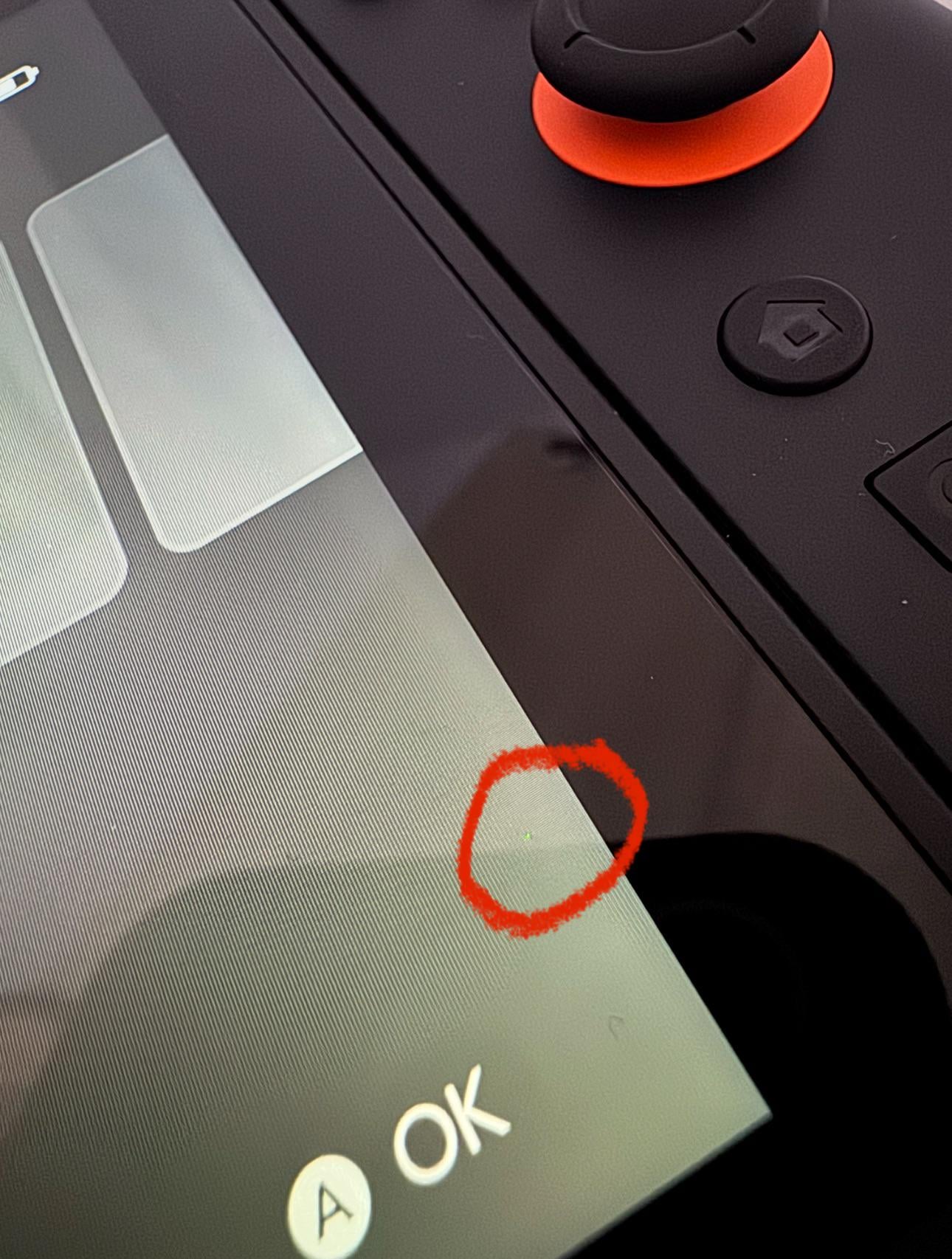
Got my switch 2 from GameStop tonight and noticed a dead pixel as soon as I turned it on debating returning it I can probably get Another one from somewhere else tomorrow morning but only issue is returning this one I would only get credit since that’s how I bought it
by ragingbulls33
36 Comments
Same here. I’m going back to GameStop first thing in the morning.
Yeah I think I got one too. Does it feel like a little bump?
And so it begins…
Someone got a good idea how to check for this? On pc monitors I’d usually open paint and fill the whole thing in different colours. What’s a good way to get static colour screens on the Switch? My only idea would be booting a particularly dark game and a particularly colourful game.
There is normally an accepted tolerance for these things. X number of dead or broke pixels is expected. But hopefully Nintendo are kind
Thankfully my gamestop one has no dead pixels.
My unit has one too, unfortunately. It sucks.
I got a few red pixels in the damn middle of the screen!!!
To each their sensitivity of course. I’m kind of an obsessive guy but a dead pixel on the very side of the screen would bug me a lot, but probably not enough to return the console.
I’m getting mine in about an hour, I hope I won’t have to go through this. Fingers crossed.
Mine too! Got it from the Nintendo NYC store.
Sorry man, I had something similar on my OG switch when that first released
Return that shit immediately if possible.
I’d be ticked off. You paid full price (and jumped through how many other hoops) to get this and it’s not at 100%.
I don’t know what the return policy is or how long you’d have to wait for a new one (or get this one fixed), but I personally wouldn’t stand for it.
I wish you luck.
I love 14 day return period in EU exactly for this.
This doesn’t look like a dead pixel, more like a stuck pixel.
Watch out, crowbcat might see this lol
Dead pixels are black, no?
my switch 1 is full of them. According to Nintendo FAQ on the issue it’s a “normal” characteristic of LCD displays…
If the store doesn’t take or exchange it for you I’d hit up Nintendo for the warranty.
Close enough, welcome back PSP
1. Play it for bout 2-3 days TOPS — this is so you can let go off all that New toy hype
2. Return get the store credit
3. Wait for restock and exchange
Step 1 is really important it will help you survive step 3
Saw this post, instantly had a feeling of dread, and holy shit mine also has a dead spot in the bottom right corner right in the middle of where it says “OK”
Pixel drift
It’s ruined now, I’ll take it off your hand half price
Not gonna love Nintendo’s take on it: https://www.nintendo.com/en-gb/Support/Nintendo-Switch/Troubleshooting/There-are-black-or-bright-dots-on-the-Nintendo-Switch-screen-that-do-not-go-away-or-there-are-dark-or-light-patches-on-the-screen-/There-are-black-or-bright-dots-on-the-Nintendo-Switch-screen-that-do-not-go-away-or-there-are-dark-or-light-patches-on-the-screen-1201195.html
Did they staple the receipt to the box?
Apparently some GameStops has been stapling the receipt to the box, but the staple is going through and damaging screens
What’s that bit close to the home button?
Kinda looks like the screen’s physically damaged?
Also, damaged screens seems to be a constant for Gamestop bought units unfortunately…
It’s a stuck pixel.
I had that on my brand new PS Vita,
Tried those YouTube videos to unstuck the pixel, did not work.
Read somewhere to massage the screen,
I tried, I was scared the break it. But in the end it worked. Stuck pixel got unstuck
My switch arrived with a broken seal 😩
Wow nintendo defense force out for this one. Its not ok, hope your issue is resolved.
The nerve…
[Nintendo Support](https://www.nintendo.com/en-gb/Support/Nintendo-Switch/Troubleshooting/There-are-black-or-bright-dots-on-the-Nintendo-Switch-screen-that-do-not-go-away-or-there-are-dark-or-light-patches-on-the-screen-/There-are-black-or-bright-dots-on-the-Nintendo-Switch-screen-that-do-not-go-away-or-there-are-dark-or-light-patches-on-the-screen-1201195.html#:~:text=software%20and%20services-,There%20are%20black%20or%20bright%20dots%20on%20the%20Nintendo%20Switch,light%20patches%20on%20the%20screen.&text=Small%20numbers%20of%20stuck%20or,not%20be%20considered%20a%20defect.)
Have a black, dead pixel right in the middle of the screen. It’s always visible while on the menu or in the store. Saw it right after the setup was completed. 🙁
Don’t worry. Screen says it’s “A ok”
That is a stuck pixel. Dead pixels are black. A stuck pixel has dots of green (like yours), blue, red, white.
You can go on YouTube and watch a bunch of flashing type videos cause they have a ton of them. That helps recalibrate the pixel. And yes, you can download the YouTube app on both original switch and switch 2.
You can gently rub the screen if you’re brave.
Or leave the device running on a static screen for a few hours.
Yes, early batches have chances of this, but not every early batch will have it
I think I won the lottery. I counted at least 17 on mine. I’ve never seen a screen this bad.