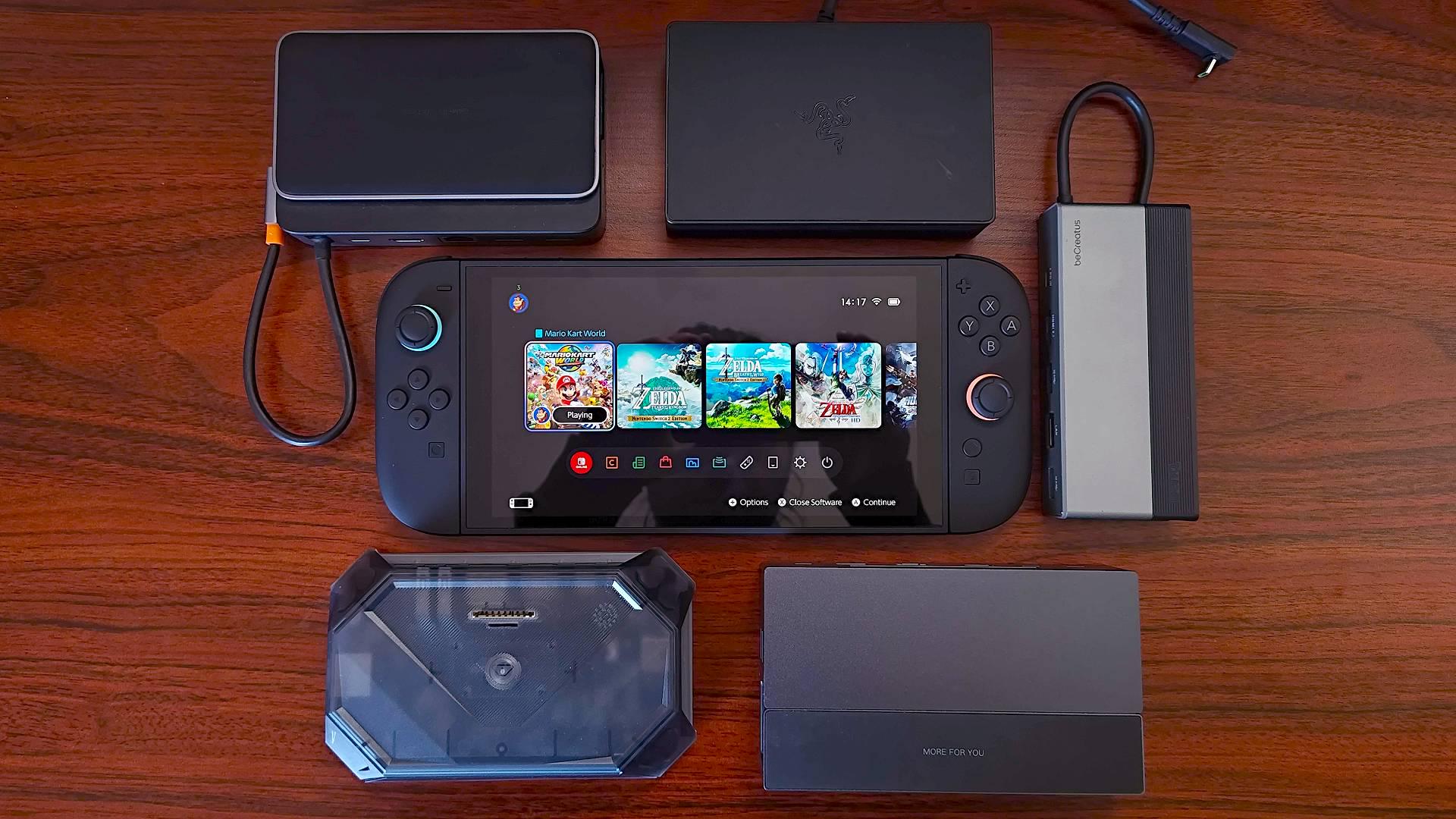
I have a handful of 3rd party docks. I've even made content about them in the early days of Switch 1 exploration.
TL;DR: No 3rd party docks or external display solutions are compatible with the Nintendo Switch 2, even despite working with the original Nintendo Switch.
Just got my Switch 2 and, since it officially supports 4k60 HDR displays with the included dock, one of the first things I wanted to test was 3rd party dock compatibility.
Docks I have:
- Skull & Co Jumpgate
- Genki Covert
- CForce CF003
- XREAL One with Hub (XR Glasses, this works with the original Switch directly plugging into its USB-C port)
- Casking C15T2 (this is a monitor, but it works with the OG Switch without needing its dock)
- Steam Deck Dock (this does not work with the OG Switch but I thought I'd try it anyway)
All of these with the exception of the Steam Deck dock work with the OG Switch which I still have from launch day. However, trying to plug the Switch 2 into any of them results in only charging coming from the USB port. Display is not routed through to the dock.
I've tested the docks with various power supplies, including the Switch 2 wall wart, the Switch 1 AC adapter, and various USB-PD-enabled power banks which are known to get these docks working with the OG Switch.
This is obviously disappointing for any number of reasons, but most upsetting to me is that this could be indicative of a proprietary display protocol on Nintendo's part. In the early days of the Switch 1 a few people had theorized that Nintendo was using a non-standard display protocol to seamlessly switch between docked and undocked modes, but it turned out that it's basically just DP over USB-C with a specific USB-PD profile requirement (needs the 15v @ 2.6a – 45w profile). The same might be true of the Switch 2, but I don't have a way of testing that.
If you have ANY experience where a 3rd party dock worked with your Switch 2, PLEASE share it here. I'd love to know what dock, and what power adapter were used.
Other discussions finding the same results:
* https://www.reddit.com/r/Switch/comments/1l3zhxl/switch_2_usb_c_video_delivery/
* https://www.reddit.com/r/Switch/comments/1l3n7wl/switch_1_3rd_party_docks_dont_work_with_switch_2/
* https://www.reddit.com/r/Xreal/comments/1l3qko7/xreal_not_compatible_with_switch_2_via_usbc/
EDIT: Xreal has made a promising discovery and is saying they're working on a fix for getting the Switch 2 to work with their Xreal One glasses. Hopefully this means that other dock manufacturers, particularly those whose docks are firmware-upgradable, can follow suit.
by Ryvaeus
46 Comments
Maybe related question, does Switch 1 work in a Switch 2 dock?
Yep this is my one gripe with the console at this point. I have a “dock” that supports up to 100W so it should be no issue, worked fine for Switch 1 that I was going to use in my workout room while im on the treadmill, but no dice.
There seems to be some kind of software change or something, and firmware updates are required.
It also has a hard requirement of using the NS2 AC adapter if you want to use the official dock (probably because of the charging kerfuffle with the original Switch and 3rd party docks).
My AC adapter is literally bricked and support is making me send in the console as well despite it being fine and charging with other AC adapters (e.g. Switch 1 charger, Steam Deck, phone charger USB-C).
One of the first things I tested as well. Unfortunate. I’ve tested both the Genki Covert 1 and 2, and two no-name Chinese ones from Amazon (with a 90w PSU for the latter two).
(Also, a complete missed opportunity for Nintendo to not offer an official travel dock.)
For all the testing you’ve done, did you try plugging the Switch 2 into the original Switch dock? If that doesn’t work, I’m not sure why it’d work with any 3rd party ones.
I’d be wary of 3rd part ones for awhile, since the S2 dock does more than video output. I believe it also has fans to keep the system from overheating.
I’ve been wanting to get the avermedia core go but nothings been updated on it
Is it compatible with Switch 1 dock?
Genki have said they may be able to get theirs to work with a firmware update but would not be sure until they had a unit. That was a couple weeks ago.
Considering the original Switch had an issue with 3rd party docks bricking the Switch I’m surprised the first thing you wanted to do with your brand new Switch 2 was plug it into a 3rd party dock.
Asus ROG Gaming Charger dock (similar to the Genki Covert) also not working. This one didn’t initially work with Switch 1 until a firmware update, hopefully will get one for Switch 2 in the future.
Yup tried this all of yesterday and came to same conclusion cause I wanted to use my rayneo glasses with the switch 2 need to wait for an update or new docks/adapters
I wouldn’t expect a Switch 1 third party dock to work with a Switch 2. I bet there will be Switch 2 third party docks that work with Switch 2 though.
probably companies will make them for switch 2
Waiting for some reviews to come back on Amazon for the siwiqu dock. 🤞🏼At 27$ I might just guinea pig it myself 🤷🏽♂️
Has any one tried blocking the 2 holes next to the usb-c port while using the 3rd party dock?
It would be so funny if Switch 2 is just judging whether it’s an official dock or not by physically.
It makes sense since they don’t want for kids to burn their hand by holding the switch while its in dock mode
Kind of makes sense… these companies will just need to go ahead and make new versions for the new system.
Gamestop is marketing a mobile dock for switch 2.
VectorSystem creator here (third party dock with a built in 15-17inch display, GC adapters, speakers etc)
We tried many docks (ranging from no name ones, to high ends, heck, we even tried the Amazon Basic USB C dongle),
So far, nothing works out, some will charge at 15V, but none we tried will trigger the 20V Power Delivery mode, no luck so far
What about this GameStop display adapter? I know it’s not out yet but maybe you can try this too
https://www.gamestop.com/gaming-accessories/chargers-cables/nintendo-switch-2/products/gamestop-tv-adaptor-for-nintendo-switch-2/20021880.html
I used to travel with a portable monitor and game with my switch 1 looks like i can’t do that either anymore.
Hoping the Jumpgate dock gets an update, or at least the Pro version
Im no expert but be careful testing docks. Ive heard and experience trouble with funky docks. With these types of devices where it draws power from battery or from charger. having it connected to a source that doesnt feed the power it needs it sometimes switches too often from power to charger or tries to compesate with battery. The “slow charging” warnings are a red flag. the chip that controls the power routing can fry. My steamdeck chip fried bc I was playing using a Power bank
Thats how I learned power banks dont output constant power… at 90% power it outputs x wattage, at 60% power its outputs x wattage, at 25% power it outputs x wattage that constant switching fries the chip.
Keep in mind… I dont know electronics at all. Im the average joe. This is bits ive found on the internet and steam support (they fix the problem fairly quickly when I shipped my broken unit)
The thing is switch 2 dock has a fan on it
Doesn’t work for me either. I have a ugreen dock that I used to use on my old switch but on switch 2 it doesn’t work
My guess is that Nintendo has offloaded some of the video processing—such as 4K and HDR—to the dock, which might explain why it now requires a fan. This could be to reduce power consumption, save internal space, or improve heat dissipation compared to a built-in solution. If that’s the case, a firmware update alone wouldn’t work unless the third-party adapter already contains the necessary processing hardware.
Why even use a third party dock? Lol
Haven’t had any luck yet… one will come out soon I’m guessing
Has anyone tried the ROG Ally Charger Dock?
Sounds similar to the issues I’m having with all headsets with low latency USB-C dongles. Soundcore VR-P10, Arctis Nova 7X etc… Microphone only. :/
Welcome Tour talks about the dock speaking to both the tv and the console, I think you’re missing a crucial component to how the Switch 2 communicates with TV’s, but admittedly I am no expert.
This one from Walmart claims to be a Switch 2 dock, but the description looks suspicious 🤨 who knows, it might just work?
TV Docking Station for Switch 2, Portable TV Dock Station Replacement for Switch with 4K HDMI and Charge Port B8Y5 https://www.walmart.com/ip/16632964629?sid=27c91338-f341-4b16-9f39-0bf71be2b1f0
So I have the official Switch 2 dock, but I’m traveling so I only brought the Pro Controller USB C cord (still an official Nintendo USB C cord) instead of the heavy/bulky plug that came with the Switch 2. Seems to be the same case.
When I plug it in or put the switch 2 in, the green light blinks on for a second, then blinks off. I should have tested before I left but it didn’t even cross my mind another cord wouldn’t work when it works to charge it.
Has anyone tried this one, on sale right now too: https://antank.net/collections/switch-2/products/s3-max
Given that the switch 2 is incompatible with the original dock I am not surprised. There is a YouTube video where some one used a USB C extender and the switch 2 did not work on the original dock and also the original switch does not work on the switch 2 dock either.
Ugreen 9-in-1 doc doesn’t work either.
Nintendo should just allow display and power through separate usb-c port then the display wouldn’t have to support PD
I’ve tested with hubs from HP, Ugreen and Baseus and none work. The only thing I can add to this conversation is that I tested a USB-C extension from ugreen connected to the switch 2 dock and it still docked without issues, but only in the bottom port, didn’t work on the top one.
Can someone reply to me when there is a working one? I want a 2nd one for downstairs and ideally one for work, I refuse to pay £92 for a dock that has a fan in and USB C like I get its the HDMI and the power adaptor as well but the fact games are expensive anyway I refuse to pay that price when surely it doesn’t cost nowhere near as much to make that.
If I may add my own tests:
I have tested the following adapters or docks, and unfortunately, none of them work.
* **Gulikit NS05**
* **Hagibis SWC01**
* **Hagibis SWC10** (this adapter supports up to 8K 60Hz and PD 100W)
All three work perfectly with the Nintendo Switch OLED.
All three tested with Anker Nano II 65W GaN charger.
Tested both Dell DA300 and DA310
Powered by original Switch 2 AC Adapter or a 65W Dell AC Adapter
Both are charging the console but HDMI output is not working
https://www.gamesradar.com/platforms/nintendo-switch-2/the-switch-2-has-a-big-dock-compatibility-problem-and-i-need-nintendo-to-fix-it-before-it-ruins-my-summer-plans/
Click on the 6/12/25 update for a more in depth explanation from JSAUX on what is going on. Hopefully the updates to firmware upgradable docks start rolling out soon.
Is this real?
In all your experiments, did you try the Switch 2 in the Switch 1 dock?
I’m gonna go ahead and assume it doesn’t work and of COURSE the others don’t either. Because the Switch 2 dock is built for the Switch 2, and has a whole cooling system for docked play because of hotter internals.
This reads like a Mom in 1992 accusing Nintendo of theft because her son’s Nintendo carts don’t work in the new Nintendo she got him.
Since your post mentions third-party docks, this notice has been added to remind users that many people are reporting issues with third-party docks providing improper power to their Nintendo Switch. This can cause a failure to charge so that the battery drains itself to 0 with no way to restore it, or just flat out bricking their systems. If you are considering purchasing one of these docks, please reconsider and go with a first party official Nintendo dock instead. Yes, they cost more, and some would say they cost too much, but the risk of damaging your hardware and losing your saves should make it a relatively easy decision. If you are concerned about the size of your dock, you can find third-party shells and transplant the innards of an official dock into a more portable container.
*I am a bot, and this action was performed automatically. Please [contact the moderators of this subreddit](/message/compose/?to=/r/NintendoSwitch) if you have any questions or concerns.*
I used one of those hdmi – type C cables that has an additional type C for power input. It doesn’t work. I hope something like it will come out since it’s what I bring while travelling
No luck here either. My trusty portable Rreaka and Hxwlo docks that worked w Switch 1 are not compatible w/ Switch 2 even when both are plugged to a 65W charger.