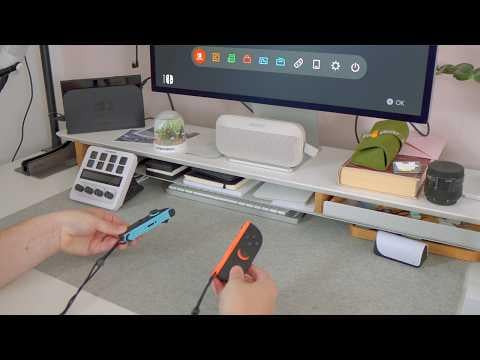
UPDATE:
Thank you u/cowleesa for taking my setup and creating a YouTube video out of it! https://youtu.be/kAROAId5MJU?si=xYtcZ5GhtNrjKZ28
Repost of my initial post but cleaned up for Switch 2.
Armed with a $1 week-long Prime trial, I spent over $800 trying various cables, adapters, and dongles to find a solution. My Amazon return rate hit over 80% (LOL), but a small price to pay for the solution I found! Buckle up, Switch fans. Welcome to the definitive guide to connecting a Nintendo Switch 2 to the Apple Studio Display.
Requirements:
- MUST preserve audio. Many solutions I've seen lose audio
- OK with plugging/unplugging between Switch and Mac depending on which device I'm using, especially since TB4/5 compatible KVM's is basically the cost of another Switch 2
- Supports Switch 2's 4K60 output
- One step to dock Switch 2
The Setup:
Audio
Switch → USB-A Sound Card plugged into Dock → AUX → Speaker
Video
Switch → CAC-1335 (HDMI to DisplayPort) → Bidirectional DisplayPort to USB-C Adapter → Apple TB4 cable → Apple Studio Display
Parts:
- Club 3D CAC-1335: Takes an HDMI signal coming from Switch 2 and converts it to DisplayPort signal
- USB-A Sound Card: Use one of the USB-A ports on the dock to get a headphone jack to output sound
- Sound Card used: UGREEN External Sound Card Jack USB Adapter for Computer, PS5, PS4, Audio Stereo Adapter External Sound Card (Black)
- We want to do this b/c otherwise docking/undocking Switch involves 1 extra step of plugging/unplugging headphone jack. We want the sound to be coming out of the dock so that it's a single step to dock Switch.
- Bidirectional DisplayPort male to USB-C female adapter: Takes the DisplayPort output of the CAC-1335 and turns it into USB-C. MAKE SURE it's bidirectional. Most adapters of this type are uni directional from USB-C to DisplayPort. Here, we want DisplayPort to USB-C, since video signal is coming from DisplayPort. I opted for adapter instead of cable b/c I want to continue using the Apple TB4 cable.
Could be useful depending on your situation:
Bidirectional DisplayPort to USB-C cable: Useful if you want a cable instead of adapter. Serves the same purpose as the bidirectional adapter above.
Example: CableCreation 8K USB C to DisplayPort Cable 6FT [HDR, 8K@60Hz, 4K@144Hz, 2K@240Hz] Type C Cable to DP 1.4 Compatible with Thunderbolt 3/4, iPhone 16 15 Pro Max Plus MacBook Pro/Air iPad XPS Galaxy S24
40GB/s USB C Extender: Useful if you have to keep plugging/unplugging the cable from the back of ASD, which is a pain.
Example: Cable Matters 40Gbps USB 4 Extension Cable – 1.6ft, Supports [8K@60Hz / 4K@240Hz Video, 240W Charging, 40Gbps Data Transfer] USB C Extension Cable, USBC Extender, USB4 / Thunderbolt 4 Compatible
At time of writing, I can confirm that this works for Switch 2 outputting 4K60. Happy gaming folks! Let me know if there's questions!
by Comprehensive-Hat527
16 Comments
[deleted]
Does your USB C extension cable work between your switch 2 and the dock? I’m looking for one because I don’t like to dock my switch.
I tried the old method with the club c without audio and I had absolutely nothing. Is there just a simple solution to use a usb C to HDMI? I don’t like a lot of cables moving around
Does it not support hdmi? Wtf
AI GENERATED POST
Thanks! Can you post a video of it working?
How well does this work on a scale of 1-10? Considering buying everything you posted
So disappointed to learn that my new Switch 2 and its shiny dock still doesn’t work with my apple studio display. SAD times indeed.
I’m in the UK, so the links you have provided don’t really work for me. However, seems to be a $100 investment? There abouts.
With the Switch 1 I tried the Elgato Capture Card – but to be honest, I didn’t get the crisp Apple Display quality and it wasn’t worth a £100 investment – for me personally.
I don’t mind too much about sound, because I can use (I think I can use?) my apple airpods max with it. But it would be great to have a cheaper solution where I can still get good quality of video to play with.
great work though, and thanks for sharing the info you have discovered.
Hi, I tried a simple HDMI to USB-C cable and it does nothing.
I ordered the setup, thank you !
Could you explain why a simple solution like this does not work ? The studio display do not turns on when the switch is docked and USB-C is plugged into the studio display port with the “thunder” icon.
Wow, I’ve been looking to do this for so long! I gave up but decided to give it a google again and found this. Thanks so much! After a little research I think it’s *possible* that this will allow easy switching between inputs: [https://www.amazon.co.uk/dp/B0CLZ7WP1N/?coliid=I2L5IBIG11P169&colid=WBV1KOI4NQST&psc=1&ref_=list_c_wl_lv_ov_lig_dp_it](https://www.amazon.co.uk/dp/B0CLZ7WP1N/?coliid=I2L5IBIG11P169&colid=WBV1KOI4NQST&psc=1&ref_=list_c_wl_lv_ov_lig_dp_it)
Do you know if this setup would work with an iMac 5K (2020)? 😭
It works for my switch 1 but does not for my switch 2. Do you know any possible reason or any setting required on my switch 2?
Amazing guide 🥰🍾 ! I was just wondering how to connect without any issues new switch 2 to Apple studio display 🙂
Btw! Is it possible to use Club 3d CAC-1336 to use a direct adapter to usb-c https://www.club-3d.com/en/detail/2610/hdmi_micro_usb_to_usb_type_c_4k120hz_or_8k30hz_m-f_active_adapter/
Have you tried that solution :)?
TBH I just use this one [https://www.amazon.com/dp/B09JSYP8VR?ref_=ppx_hzsearch_conn_dt_b_fed_asin_title_1&th=1](https://www.amazon.com/dp/B09JSYP8VR?ref_=ppx_hzsearch_conn_dt_b_fed_asin_title_1&th=1)
and this one output the video but not the sound but I think I will try your out putting the sound
did you found out a way to use the speaking from the studio display?
For anyone wanting to try the CableCreation 8K USB C to DisplayPort Cable with the CAC-1335, it sadly does not seem to work :/