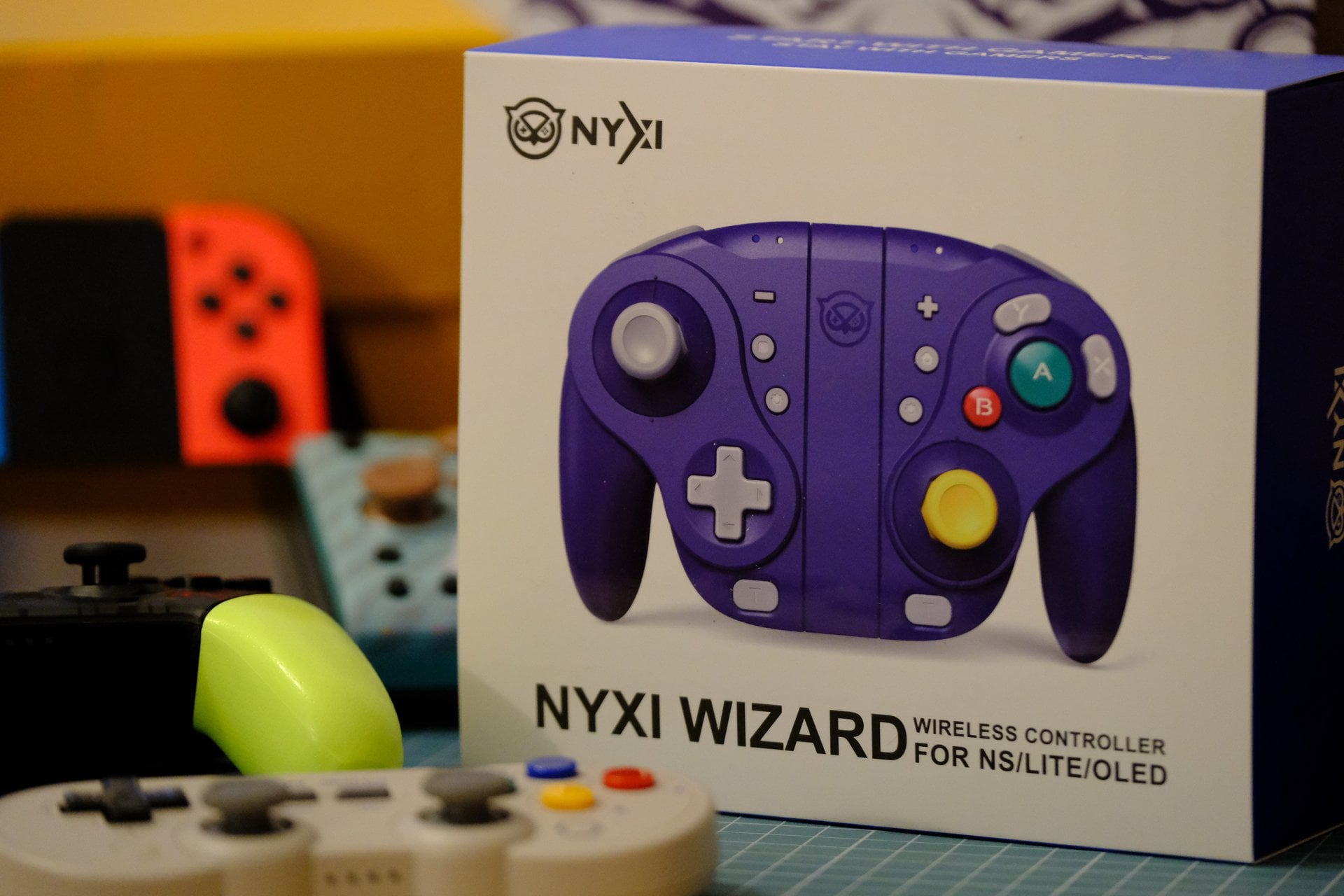
**TLDR:**
NYXI Wizard is unique due to it’s Gamecube controller inspired design and A/B/X/Y button layout. It’s ergonomic for medium or large hands. The D-pad could be improved upon. Currently there is no way to turn off the blinding indicator lights, hopefully it’s something that will be fixed in a firmware update. The shape, combined with mechanical triggers, mappable back-paddles, turbo and gyro make the NYXI Wizard a versatile primary or secondary controller. Lastly, the NYXI Wizard’s conductive adhesive switches used in the A/B/X/Y buttons are just smashing. They are responsive and pressing them feels perfectly weighty. Whether it’s GRID, Crysis, Super Smash Bros or something else NYXI Wizard has got you covered (as long as it fits in your hands).
**[Here](https://imgur.com/gallery/zqgxYRq) are the photos that are part of the review (imgur link).**
**Disclaimer:**
This is my second Nintendo Switch related text review in our community. The previous review was received quite well and people asked if I could do a joy-con comparison and so I asked NYXI if they are interested in providing me with their NYXI Wizard controller with the purpose of writing an exclusive review intended for the /r/Nintendo, /r/Switch/ & /r/NintendoSwitch/ subreddits. They were. My condition was that the review would be a pure oldschool text review with eight photos taken by me. I get to keep the controller. I won’t be receiving additional compensation in any form (no commission fees, affiliate marketing or ad-revenue etc). As my Nintendo Switch controller collection grows, I might write more reviews for our Switch-related subreddits. This review is based solely on my experiences with NYXI Wizard and 27 days of testing.
**About me.**
Born in 80s. I’ve been playing videogames since the early 90s. A NES clone was my first console followed by GameBoy and a PC etc. I’m a freelance copywriter. Professionally I’ve been a part of the gaming tech field & tech journalism for about two decades (Europe/Estonia). It’s a interesting field, but it can have an affect on how you view or enjoy videogames.
On PC my favorite videogames were Heroes of Might and Magic 3, Rainbow6: Siege & DayZ. On Nintendo Switch it’s either Mario Kart 8 or Door Kickers: Action Squad. Now comes the “heartbreaking” story. I lost the ability to enjoy PC gaming about five years ago. A few years ago I wanted to buy a Christmas gift for my fiancee. She was getting burnt out at university. The users of /r/switch and /r/nintendoswitch were kind enough to answer all sorts of questions I had regarding the Switch console. So I bought her a Nintendo Switch OLED. She loved it (once she got used to the controls) and it helped with the stress. At some point I thought that I’d try one of her switch games with no expectations. Fell in love with the ability to play on a couch and less serious tone many Nintendo games have (GameBoy flashbacks). And here we are, I don’t have to “borrow” her switch anymore. I have my own Nintendo Switch and too many games and controllers 🙂
Cheers 🙂
**What this review is and is not.**
The NYXI Wizard will be reviewed as a Nintendo Switch joycon and compared to other Switch joycons that I own. A major portion of the review will be dedicated to real life use scenarios. A limited amount of technical details will be included. This review will not cover every detail about the NYXI Wizard (such as how to change all of the settings, pair, turbo etc). The manual has all that information and can be found online.
**What’s a NYXI Wizard and what do I think about certain marketing?**
According to some a major selling point of the [NYXI Wizard](https://nyxigame.com/product/nyxi-wizard-wireless-joy-pad/) you will never buy another Nintendo Switch controller again and it will never develop joycon drift. We should always be skeptical when it comes to claims that cannot be backed up by any testing or examples. How do you prove the part of “forever”? While I was never sold on the promise of forever, the NYXI Wizard intrigued me enough with its unique button layout.
**The box & what’s in the box?**
The box for the controller itself is a sturdy blue cardboard box. Inside there is the controller, a small manual, a 127 cm regular plastic charging cable and an extra set of interchangeable joystick rings. Maybe I’m spoiled by past experiences, but I would really have wished to see some sets of interchangable joysticks inside the box (more on these later).
**How’s the manual?**
The NYXI Wizard’s manual is decently written, but it’s one of those rather small manuals.
Luckily you can find the manual from NYXI’s website https://nyxigaming.com/pages/nyxi-instructions.
**Lets talk about the interchangeable joystick rings & potential for modding.**
The controller comes with round and octagonal rings. Octagonal rings can be helpful in 2D or fighting games for example (Mortal Kombat). The round rings are suitable for all games but octagonal rings have more limited use. It’s a nice extra to have, but it is an extra. It can be tricky to change the joystick rings for the first time. Once you replace the rings about five or more times it gets easier.
I personally perform better in games with the more modern round joystick rings. Obviously it’s a matter of preference here. However I made more errors in movement with octagonal rings. The difference was about 7%, but to me the difference was there. Currently I have round rings installed and I don’t see myself switching back to octagonal rings.
Note:
When it comes to modding the NYXI Wizard the interchangeable joystick rings make it easier to replace the thumbsticks. You can even install original GameCube thumbsticks with some effort. A youtube video explaining the process is titled “I Made The NYXI Wizard Better…” (shoutout to 128KB).
**Backlit-buttons.**
The NYXI Wizard has A/B/X/Y buttons that are backlit and it’s possible to change their brightness. Even if you turn the background light off, it only has an affect on the A/B/X/Y buttons. There are two indicator lights on top of both joycons and those cannot be turned off. It would have been a nice feature to have where the indicator lights turn off or at the very least are slightly less bright.
Note: I reached out to NYXI about the indicator lights. They informed me that while currently there aren’t any such plans they might be able to fix this issue in a future firmware update.
**Lets talk about the A/B/X/Y buttons.**
In comparison to Nintendo Switch Pro Controller, joycons or Hori Split Pad Pro, the NYXI Wizards buttons feel more responsive. They require a bit more force to push and it’s a pleasant feeling. The 8BitDo SN30Pro has similar buttons but still not quite as good. Overall the buttons have a solid feel to them and are on the heavier side when it comes to the amount of pressure you have to apply. Among the Nintendo Switch joycons and controllers the NYXI Wizards A/B/X/Y buttons have a unique place.
Note: I reached out to NYXI for more information about the A/B/X/Y buttons. Here’s the reply:
“The A/B/X/Y buttons on our controller use the conductive adhesive switches. We chose these switches for their durability and responsiveness. As for the force required to press the buttons, we wanted to create a tactile and responsive experience for our users.”
**The layout of A/B/X/Y buttons.**
One thing is for sure. The button layout of NYXI Wizard is different. My favorite feature of this layout is the massive A button right in the middle. In the games I play often, A button is one of my most commonly used buttons. Because the buttons are larger/have a different layout, it also brings a small challenge to re-learn the locations. It took me about 2 or 3 days. If you end up wanting to use the controller but want to make the layout a bit closer to traditional Swtich joycons then there are a few ways to approach this.
1. Remap the buttons in the game.
2. Remap the buttons in Switch.
3. Assign one of the A/B/X/Y buttons to the remappable back-paddle.
**What about the D-pad?**
I really like the looks of hard plastic they have used to make the D-pad. But pressing the D-pad really isn’t very enjoyable. The edges feel a bit too sharp, so to speak. I’m not a fan of the D-pads position either. The D-pad is the hardest to reach out of all the Switch controllers I own.
Note: I think that a potential upgrade here could be to make the D-pad edges just a tiny bit rounder and move it slightly closer to the left stick.
**Lets talk about joycon drift and thumbsticks.**
Joycon drift is an issue where the thumbstick starts to give false signals to your console and move your character in a direction that you didn’t intend. It happens due to dust getting into joycons or joycon wear. NYXI Wizard has addressed this by using a hall effect joysticks which is a technology that is supposed to never get joycon drift. Setting the technology itself aside, the thumbsticks feel good to use. Their movement is smooth and responsive. The Wizards thumbsticks are similar in size to Hori Splitpad Pro but bigger than the regular Nintendo Switch joycons. A standout of these thumbsticks is the rubbery finish which is very pleasant to hold. It has a nice grip and has a slightly soft feel to it. Out of all the Switch joycons and controllers I own, this is the best thumbstick finish.
With confidence I can say that NYXI missed an opportunity by not including extra thumbsticks that are taller or shorter. In the end a thumbstick is a rather cheap component but it can add extra value to the gamer. My hope here is that NYXI might release additional thumbsticks of different sizes as optional accessories. The good news is that I got confirmation from NYXI that they plan to release accessories like thumbsticks with various sizes soon.
**The triggers.**
This controller uses mechanical triggers. These are responsive if you compare them to joycons or controllers that use non-mechanical triggers (such as the official Nintendo Switch joycons or the Hori Split Pad pro). It takes very little force to press these triggers which may be beneficial for longer gameplay sessions. The travel distance of the triggers is pleasantly short and the trigger makes an audiable click when its activated. The short travel distance makes it easier to rapidly press the trigger. The Mobapad M6 Gemini has similar triggers. Hori Split Pad Pro, official Nintendo Switch Joycons & Pro Controller have slightly less responsive triggers in comparison.
**Ergonomics?**
If your hands are big enough then the Wizard is an ergonomic controller. One of the main advantages of NYXI Wizard is that while holding it, your finger position is different than when holding a Hori Split Pad Pro or the official Nintendo Switch joycon. Using different styles of controllers can be one little thing that you can do to take care of your hands and fingers. I’ve used it as my main controller for 27 days and am happy with the ergonomics. This means that it’s my main joycon for now. At some point I will go back to Mobapad M6 and then something else or return NYXI Wizard.
**Gyro, mappable back-paddles.**
Gyro works well, even in FPS games such as Crysis. There are also mappable back-paddles present on the the Nyxi Wizard. The paddles themselves aren’t very well placed in my opinion as they are a bit hard to reach, but they have a nice texture on them and a responsive feel. Among other buttons, you are able to map the back-paddles to triggers (which isn’t possible on all joycon back-paddles).
**The vibration motor.**
The vibration motor is decent. It isn’t HD-rumble, but in a way that’s to be expected as the only joycons that have HD-rumble are the official Nintendo Switch joycons. All vibration settings work well, I personally liked playing on low or medium setting. The highest vibration setting was nice when the Switch’s volume was louder, otherwise sound of the motor broke gameplay immersion.
**Bonus content: what may people with smaller hands think of NYXI Wizard?**
As a new part of the review I asked my fiancee (who has small hands) to test the NYXI Wizard and share her impressions. She was fond of how the triggers felt. The amount of force you had to apply and click of the triggers appealed to her. Another one of her favorite features was the way joysticks were textured. Obviously the yellow one got more praise due to its cute color. NYXI Wizard was wa-a-ay too big for her hands. She pointed out that if she had to play something that requires faster reactions, it would be nearly impossible with this controller. The size of the controller, the distance between buttons is just too great. For games like Picross it was okay, but after some gameplay time the NYXI Wizard made her hands hurt. So what’s the verdict here when it comes to the NYXI Wizard if you have smaller hands? Try it before you buy it. It’s likely that controller might just be a too big.
**Most common questions:**
Can the NYXI Wizard be used to wake up your Nintendo Switch? Yes it can.
Will it fit inside a carry case that’s meant for Nintendo Switch OLED + Hori Split Pad Pro/Mobapad M6 Gemini? No it won’t. NYXI offers a case for the Wizard on their website: https://nyxigaming.com/products/nyxi-carrying-case-for-wizard-hyperion-athena
Can it be used as a controller? Yes it can.
**Final thoughts.**
The NYXI Wizard is a Gamecube inspired joycon/controller that is executed well with room for some improvement. The asking price of $69.99 seems to be fitting. It doesn’t have a direct controller to compare to due to the unique features such as the layout and interesting A/B/X/Y buttons. In my opinion the A/B/X/Y buttons are among one of the best features of the Wizard. Yes, these four buttons aren’t mechanical but they have a very pleasant resistance and travel distance. The price is worth it to those who like the size & layout of the controller and value features such as mechanical buttons, triggers & unique A/B/X/Y buttons.
Will a gamer benefit from the features that come with the pricetag? Yes, we will (most of them).
Will a newer/casual gamer benefit from the features? Yes, some of the features (like the mechanical buttons and different layout with good ergonomics).
**And here is a comparison table.** Rating 1-5 (5 being the best).
I did my best to rate various features of the Switch joycons that I own. Keep in mind that such comparisons are subjective and ratings might vary from person to person (mostly depending on shape & size of your hands). All of these are rated as joycons and are not rated as a controller.
The price is for the regular model of any controller and is based on the official pricing I found/received. This does not include sales or limited edition color schemes that may cost more.
Model | Nintendo Joycons | Mobapad M6 Gemini | Hori Split Pad Pro | NYXI Wizard
—|—|—-|—-|—-
D-Pad | 3 | 4 | 4 | 3.5
Thumbsticks | 3 | 4 | 4 | 4.5
Triggers | 3 | 4 | 3.5 | 4.5
Buttons | 3 | 4.5 | 4 | 4.5
Build | 5 | 4 | 4 | 4
Ergonomics | 3 | 5 | 5 | 4.5
Features | 3.5 | 3.5 | 3 | 4
Included accessories | 4 | 3 | 3 | 4.5
Vibration | 4 | 3 | – | 3.5
Price | $79.99 | $55.99 | $49.99 | $69.99
Weight | 99g | – | 152g | 229g
**What could be improved upon:**
1. The interchangeable joystick rings are a novelty item for most users. I would recommend them as an additional extra item/accessory that you can add to your order.
2. It would be beneficial to have thumbsticks of various sizes. The groundwork is already done and NYXI has made it very easy to swap the sticks. Adding short/medium/tall stick options in the store would make sense.
3. Nintendo Switch has a dedicated fanbase and a decent amount of them really enjoy changing the way their console looks. The ability to order sticks of various colors (such as yellow, pink etc) would be a treat to those who like modding their Nintendo Switch and the joycons.
4. Additional color schemes and designs/transparent or semi-transparent casings for the controller might appeal to gamers. For example the recently released Zelda themed Nintendo Switch Pro Controller proved out to be a massive hit. Bonus: I got confirmation by NYXI that more colors will be released soon.
5. Adding a way to lower or turn off indicator lights would be a welcome change. It’s possible to turn off the A/B/X/Y lights but you cannot disable the indicator lights. Be warned: the indicator lights are BRIGHT! If you are gaming in a darker room and have turned down your Switch brightness to preserve your eyes, the indicator lights will stick out like flashlights. There is an easy fix: put a sticker on your NYXI Wizard and cover the indicator lights. However most people don’t want to put stickers on their joycons for basic functions.
6. Outside of the colors themselves, the plastic used in the controller is a major factor in how the controller feels in the users hands and if users consider it to be “premium”. It’s worth looking into different kinds of casing materials. Nintendo Switch Pro Controller has a premium semi-glossy finish and the plastic smooth. Another good example is the 8BitDo SN30Pro which uses a matte plastic casing and also feels solid.
7. Making the D-pad edges just slightly more rounder would make it more pleasant to use.
8. Moving the D-pad closer to the left stick would make it more ergonomic.
9. Placement of the back-paddles could be improved on in terms of ergonomics.
10. A compact version of the NYXI Wizard might appeal to many.
11. Adding adjustable analog triggers might be considered.
12. HD-rumble would make gameplay more enjoyable.
13. A larger manual would benefit many customers.
14. If interchangeable joystick rings ever become sold as accessories then increasing the color and finish options would be a welcome addition to the NYXI selection.
Photography equipment used: Fujifilm X-T4 mirrorless camera, Fujinon XF 50-140mm f/2.8 R LM OIS WR lens, Fujifilm MCEX-11 macro extension tube, Carl Zeiss Jena Flektogon f/2.4 35mm lens. helicoid extension tube.
**Closing notes:**
I hope you liked the review 🙂 Congratulations to everyone who made it to the end! Any and all thoughts about the controller are welcome. NYXI employees will read this post and the comments. So you can use it as a easy way of giving your own personal thoughts regarding this controller (and features you would like to see).
Mods if you need me to remove anything from the post that is against the rules, please message me. I will edit as needed.
What are your impressions of this controller if you already own one?
My personal thanks to Lyra & the entire NYXI team!
by qUxUp
11 Comments
The Gamecube controller was always my favorite
This was a really interesting controller. I wanted to get one but they were sold out and then I’ve honestly t been playing her switch much (not even Zelda 😳). Id like one in a different color. Green or translucent would be my preferences. I get that they wanted to launch with GameCube purple though.
Does it have motion controls like joy cons?
Does it have NFC capabilities?
Are there any photos of the Wizard connected to the Switch like the normal Joycons?
I just ordered one a couple days ago. Glad to see your review has only reinforced my purchasing decision. Im excited to play with the new joycons.
I have a Hori split joycon and its much nicer than standard joycon, but i have a feeling I’ll really enjoy the handles on the gamecube wizard controller more
I’m looking to purchase one of these and honestly most of the issues You list sounds as if you didn’t use or enjoy the GameCube controller (I am assuming and may be wrong with it as such), personally I grew up with it as my first controller and I am so excited to use it, as soon as I get it in hand I will do a direct comparison to official GC controller!
Gamecube controller? More like Game-cute controller! But seriously, NYXI Wizard rocks too.
Gamecube controller? More like Game-cute controller! But seriously, NYXI Wizard rocks too.
I found it interesting how companies were copying Shank Mods’ design on “GameCube Joycons”
Nice review! 🙂 I always enjoyed the GC’s quirky personality and design when compared with the other rivals of it’s gen, so it’s good to see people are bringing that unique controller style back.