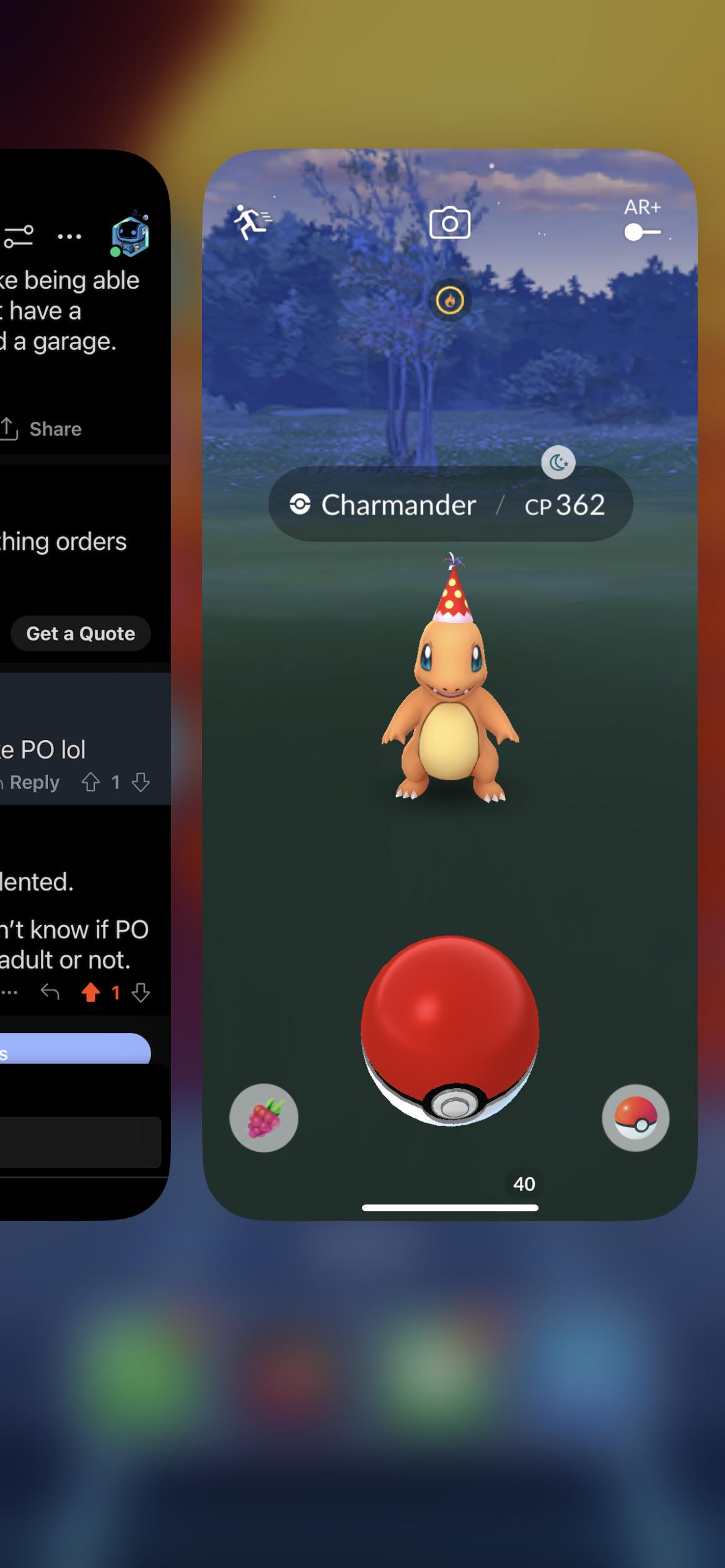
Doesn’t happen often but actually did happen today during my walk and had me laugh.
Theevencoolerkid69
To many
Naegleria_fowlhori
What’s going on here? Samsung user
Jazzlike_Bar_291
Not as many if you throw curve balls instead
Ill-Gas-232
0, never had that problem in the picture
Psychological-Talk85
Wait til you get to Johto
Nindroid2012
Or if I’m swiping up to clear notifications (like to run away from a pokemon or something)
Ctmeb78
I own a Samsung, but my phone’s setting are just like this
I don’t know if it’s more sensitive on iPhone but not that many from this. You don’t accidentally swipe up and open your app windows like that too often.
RowanMemes
None, iPhone 8
Dialgan
iOS user, and I’ve never had this happen to me. I assume you’re doing straight throws right from the bottom of the screen? You don’t have to touch the ball to toss it; you can tap anywhere on the screen to initiate a throw.
For me, I always do curve balls and I always initiate the throw around the middle of the screen. Curves are worth getting used to if you don’t do them already, as it adds a ×1.7 multiplier to the catch rate.
bluedressedfairy
too many
Pro_Banana
This happened to me a few times but never wasted balls for it.
ZealousidealGoat7151
To many to count
SexySherk42069
It has only happened once to me, and that one time it was my last pokeball, and the Pokémon was shiny, and so I tried to go back in and I ran out of poke balls so I tried to quickly open a gift and my game crashed. I loaded back into the game and when I tapped on the Pokémon it immediately fled. It didn’t even let me encounter it
Much-Car-7522
To many
No_Stranger_4959
I had more issues trying to catch squirtle. I swear i threw 10 pokéballs at it and it always escapes. Yet a cp level 800+ bulbasaur I catch first try.
YourNewRival8
None? Is this a thing that happens?
PowerlinxJetfire
I occasionally do this to myself on Android, but I can’t lose a Poké Ball.
If I’ve already started spinning, the system knows I’m not trying to do a navigation gesture even if I spin right on top of the gesture bar. The only way I can do this is by starting the spin on the bar, in which case the ball isn’t picked up in the first place.
g_lenn_o
Yes. 😔
Much-Audience-5800
*laughs in samsung*
TheBroticus42
My biggest problem is spinning for a curveball and my fingernail *barely* lifting my finger up just enough to release the pokéball and fuck up the throw
thedeanorama
I save my red balls for my Ranger so it really hurts when I throw away my blues.
xAlice_Liddell
A few after upgrading my 7+, but you get used to it.
NoNamePhantom
Lots
No-Earth8199
I had 60 when starting out today, only caught about 25 event pokemon plus a dragonite.
Zeraorawastaken
I thought this was literally the title question, until I stopped and thought what else this could mean (for those who don’t know: on iphone, when you swipe up near the bottom of the screen, the control centre will appear, and can be closed by swiping up). Yeah, it is really annoying when this happens. I don’t often make this mistake while catching Pokémon but, this is a problem for me in training/BL (don’t think I’ve ever lost any pokéballs as a result of it, tho)
medzfortmz
That doesn’t happen too often, I do get my curve balls canceled out though when for some reason if registers me hitting the poke ball icon. Yesterday and today have been rough with that issue,m. I haven’t had the issue in quite awhile but it’s every other throw recently. Probably because it’s roughly 100-110 when I go on my walk and I’m dying and so is my phone.
FURYBURGER12
RIP my master ball 🪦 I guess a random starly is a good use. Sweaty phone screen 💀
Standard_Primary_175
So many! Especially when its a low laying target.
When a precious rescue ball in a raid drops to the ground is when it really hurts 🙁
xDragonetti
Fun fact. I learned when playing claw on codm that all you need to do is use guided access.
Example my 3rd finger would always drag the top screen down. Cut on guided access and do a thin rectangle over the top edge of the screen and it prevents the drag down.
For PoGo do the thin rectangle at the bottom of your screen

Naoga
if ur having an issue i recommend enabling Guidef Access!
36 Comments
I’ve messed up a couple battles because of this
Ten. We’re just talking about today, right?
Many
Doesn’t happen often but actually did happen today during my walk and had me laugh.
To many
What’s going on here? Samsung user
Not as many if you throw curve balls instead
0, never had that problem in the picture
Wait til you get to Johto
Or if I’m swiping up to clear notifications (like to run away from a pokemon or something)
I own a Samsung, but my phone’s setting are just like this
I don’t know if it’s more sensitive on iPhone but not that many from this. You don’t accidentally swipe up and open your app windows like that too often.
None, iPhone 8
iOS user, and I’ve never had this happen to me. I assume you’re doing straight throws right from the bottom of the screen? You don’t have to touch the ball to toss it; you can tap anywhere on the screen to initiate a throw.
For me, I always do curve balls and I always initiate the throw around the middle of the screen. Curves are worth getting used to if you don’t do them already, as it adds a ×1.7 multiplier to the catch rate.
too many
This happened to me a few times but never wasted balls for it.
To many to count
It has only happened once to me, and that one time it was my last pokeball, and the Pokémon was shiny, and so I tried to go back in and I ran out of poke balls so I tried to quickly open a gift and my game crashed. I loaded back into the game and when I tapped on the Pokémon it immediately fled. It didn’t even let me encounter it
To many
I had more issues trying to catch squirtle. I swear i threw 10 pokéballs at it and it always escapes. Yet a cp level 800+ bulbasaur I catch first try.
None? Is this a thing that happens?
I occasionally do this to myself on Android, but I can’t lose a Poké Ball.
If I’ve already started spinning, the system knows I’m not trying to do a navigation gesture even if I spin right on top of the gesture bar. The only way I can do this is by starting the spin on the bar, in which case the ball isn’t picked up in the first place.
Yes. 😔
*laughs in samsung*
My biggest problem is spinning for a curveball and my fingernail *barely* lifting my finger up just enough to release the pokéball and fuck up the throw
I save my red balls for my Ranger so it really hurts when I throw away my blues.
A few after upgrading my 7+, but you get used to it.
Lots
I had 60 when starting out today, only caught about 25 event pokemon plus a dragonite.
I thought this was literally the title question, until I stopped and thought what else this could mean (for those who don’t know: on iphone, when you swipe up near the bottom of the screen, the control centre will appear, and can be closed by swiping up). Yeah, it is really annoying when this happens. I don’t often make this mistake while catching Pokémon but, this is a problem for me in training/BL (don’t think I’ve ever lost any pokéballs as a result of it, tho)
That doesn’t happen too often, I do get my curve balls canceled out though when for some reason if registers me hitting the poke ball icon. Yesterday and today have been rough with that issue,m. I haven’t had the issue in quite awhile but it’s every other throw recently. Probably because it’s roughly 100-110 when I go on my walk and I’m dying and so is my phone.
RIP my master ball 🪦 I guess a random starly is a good use. Sweaty phone screen 💀
So many! Especially when its a low laying target.
When a precious rescue ball in a raid drops to the ground is when it really hurts 🙁
Fun fact. I learned when playing claw on codm that all you need to do is use guided access.
Example my 3rd finger would always drag the top screen down. Cut on guided access and do a thin rectangle over the top edge of the screen and it prevents the drag down.
For PoGo do the thin rectangle at the bottom of your screen

if ur having an issue i recommend enabling Guidef Access!
Too many to count.
None because I know where to put my finger