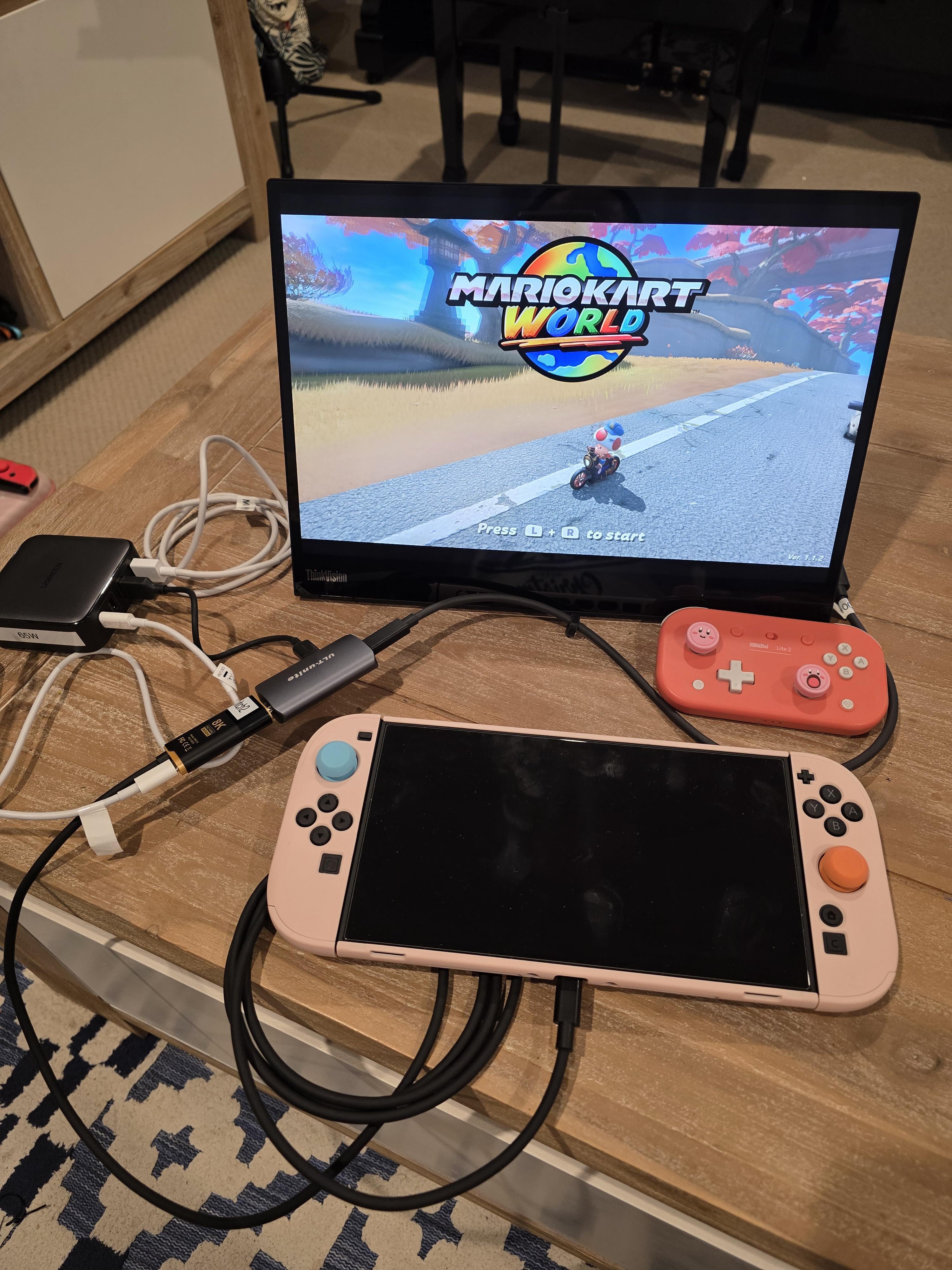
If you are like me, who doesn't want to bring the original Switch 2 dock for travel or does not want to use it, and have a USB-C portable monitor, here is how you can do the setup with compact devices.
Power: multi port PD adapter with at least 65W. I use Ugreen 65W as pictured.
Travel Dock: It is a cable! How convenient. Mine is a Hagibis 8k60 USB-C to HDMI adapter. This is powered by the main USB-C of of the PD adapter. This must have 60W power.
HDMI to USB-C adapter: I use ULT-unite compact adapter. This is powered by the USB-A to USB-C cable of the PD adapter. For the USC-C out to the monitor, you must use a USB-C DP Alt cable, otherwise you will not get video signal.
Monitor: I use Lenovo Thinkvision M14 Gen 2. This is powered by USB-A to USB-C cable from the PD Adapter.
The monitor does not have audio out. So you will need to use stereo jack, switch speaker, or bluetooth audio.
by fkrkz
11 Comments
Did we all forget the Switch itself has its own screen and kickstand?
Seems like a lot of faff for a screen that’s like 3 inches bigger than normal
So which of these is the actual dock that works witn Switch 2? There arent many of these and im looking for a second dock for my workout room.
Just play it handheld at this point lol
i would get it if it was plug and play and not a rube goldberg machine
This is so stupid. The screen is barely bigger than the Switch itself. So once you put the screen further away on a piece of furniture, the Switch itself would look bigger in your hands.
all this and still you have no audio? lmaoooo
I agree this setup might be stupid and cumbersome for most people, but it works for me for the following reasons.
My old eyes have issues with small screen and reading distance. Some games’ texts are just too small for me when using on handheld. So I can’t stand gaming for many hours without bigger screen and I’m not bringing my big TV for my travel. Of course no issue with Mario Kart as I don’t do much reading on that game
When playing local multiplayer, larger screen is more fun
Audio is no issue. It is delivered by my travel bluetooth speaker or my headphones, depending on situation
I use the same setup for my 32″ 4k HDR USB-C monitor. Its 2x HDMIs are already used by my PCs
Hagibis has a simpler all-in-one USB-C DP small hub (mostly for XR glasses) that works wonders for my OG Switch but sadly they don’t have the firmware update (if it’s capable at all) for Switch 2 yet. Using my Anker Prime powerbank to power everything, I was able to game for hours. If they can deliver update for that USB-C DP hub, then I can have a much simpler setup.
Lots of people are still looking for 3rd party dock solutions. I am hoping this example might help for people looking for ways to use USB-C display devices. These ones are very cost effective too. You can get that same setup for perhaps $50 excluding monitor.
That is definitely one way to do it. I bought a second dock and took the guts out of it and put it in a 3D printed shell that is much smaller. Very similar to the third party shells for the switch 1 dock. Easily fits in my bag and take with me when travelling.
Looks a little Frankenstein
Not sure why people are criticizing you. I’ve got a 16” portable oled monitor and it’s great— like 4x the screen area while weighing less than two pounds. Though I’ve not bought a portable dock for the S2 yet.