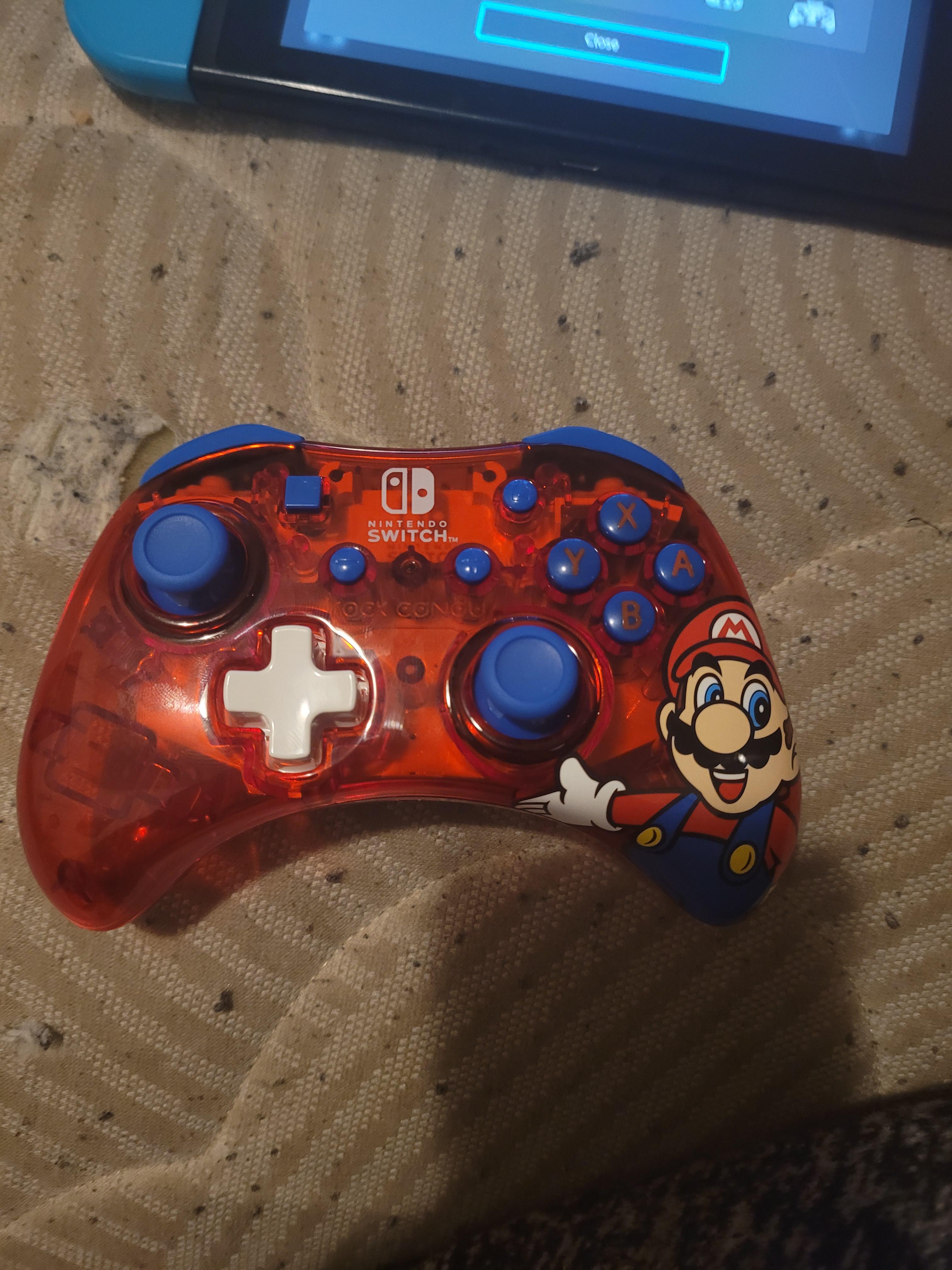
I can’t find the sync button on this controller, am I being stupid or is there not one?
I can’t find the sync button on this controller, am I being stupid or is there not one?
by toast_459
30 Comments
JesusLazalde123
That doesn’t look like a real controller
Water_Check
You gotta tickle his mustache until he yells
mrbmi513
What’s the brand/model? Did it come with a manual of some sort? It’s not an official Nintendo first-party controller, but that doesn’t mean it won’t work.
Nasume2
Can you hook it up to the dock with a USB C cable. And dock the nintendo
montyolaf
Do you have to have a cable plugged in to sync like a PlayStation? I can’t remember how it works on switch it was so long ago I synced it.
Fwumply
Dock with the cable. On a real pro controller, the sync button is right by the USB port
toast_459
The issue has been resolved thanks for the help everyone
Raydizzle29
This is a real controller but it’s wired only. I got this same one for my son.
tiagotheisen
If It is a generic bluetooth controller, you need to press and hold Y + “home” Button (or start, selecta or something like that), and then the sync light Will start blinking
cinemaparker
I don’t think that’s a legit Nintendo controller.
diaperedwoman
Not all controllers are wireless, some need to be plugged in for them to still work.
BamaSOH
Cool looking controller
darkpyro2
Yeaaaah, these wired controllers with removable cables are convenient but confusing. I bought a cool looking Pokemon one thinking it was wireless, but the price should have tipped me off. I’m definitely not going to find fault in an easy-to-replace cable.
JoseProYT
Some controllers have a removable wire but are not wireless. I don’t know why is that a thing, but there are a lot of them out there (I accidentally bought one of them last year, then I returned it back)
In conclusion: you’ve been scammed
JoDirt-
Justin, is that you?
JoDirt-
Nvn
Local_Peak_8291
I have the same one but the plastic on mine isn’t clear. This one needs to be hooked up via USB cable to the switch dock if it’s not a wireless version.
r-Catg
This looks like one of those weird third party ones. Try holding ZR, R, ZL, L, and Home. That has worked for a lot of people on third party controllers.
Cinderea
That controller needs to be connected to the Game console, it’s not wireless
sern14
If that’s actually a wireless controller, maybe try holding Y + start button when turning it on to pair it to switch, for pc X + start. At least that’s how I do it with my controller.
GermanBall_Animation
The sync buttons are L and R
Mansnotepic
was your controller made by cock concou
Rouxmain
behind the controller on the Mario dick
SadAstronomer8704
Back/bottom?
Confident-Radish-729
I think it’s on the top, if not it’s probably not wireless
Zer0DusT1
I wish I could go back and show off this wireless controller my brother and me bought.
it was third party, and the sync button was under the battery case in order to make it connect with the 360.
guess what the problem was though?
you had to remove the rechargable battery in order to sync it, making doing so completely pointless…
Zolomight
Wired controller use a usb c cable that came with it, u can prbly only use it in docked mode
Dance_Sheldon_Dance
Jesus Christ, is that your mattress?
JeffGonz
The box for it says wired not wireless
Which-Classroom-6268
I got one like this for Christmas, I think they are the rock candy, they need a wire.
30 Comments
That doesn’t look like a real controller
You gotta tickle his mustache until he yells
What’s the brand/model? Did it come with a manual of some sort? It’s not an official Nintendo first-party controller, but that doesn’t mean it won’t work.
Can you hook it up to the dock with a USB C cable. And dock the nintendo
Do you have to have a cable plugged in to sync like a PlayStation? I can’t remember how it works on switch it was so long ago I synced it.
Dock with the cable. On a real pro controller, the sync button is right by the USB port
The issue has been resolved thanks for the help everyone
This is a real controller but it’s wired only. I got this same one for my son.
If It is a generic bluetooth controller, you need to press and hold Y + “home” Button (or start, selecta or something like that), and then the sync light Will start blinking
I don’t think that’s a legit Nintendo controller.
Not all controllers are wireless, some need to be plugged in for them to still work.
Cool looking controller
Yeaaaah, these wired controllers with removable cables are convenient but confusing. I bought a cool looking Pokemon one thinking it was wireless, but the price should have tipped me off. I’m definitely not going to find fault in an easy-to-replace cable.
Some controllers have a removable wire but are not wireless. I don’t know why is that a thing, but there are a lot of them out there (I accidentally bought one of them last year, then I returned it back)
In conclusion: you’ve been scammed
Justin, is that you?
Nvn
I have the same one but the plastic on mine isn’t clear. This one needs to be hooked up via USB cable to the switch dock if it’s not a wireless version.
This looks like one of those weird third party ones. Try holding ZR, R, ZL, L, and Home. That has worked for a lot of people on third party controllers.
That controller needs to be connected to the Game console, it’s not wireless
If that’s actually a wireless controller, maybe try holding Y + start button when turning it on to pair it to switch, for pc X + start. At least that’s how I do it with my controller.
The sync buttons are L and R
was your controller made by cock concou
behind the controller on the Mario dick
Back/bottom?
I think it’s on the top, if not it’s probably not wireless
I wish I could go back and show off this wireless controller my brother and me bought.
it was third party, and the sync button was under the battery case in order to make it connect with the 360.
guess what the problem was though?
you had to remove the rechargable battery in order to sync it, making doing so completely pointless…
Wired controller use a usb c cable that came with it, u can prbly only use it in docked mode
Jesus Christ, is that your mattress?
The box for it says wired not wireless
I got one like this for Christmas, I think they are the rock candy, they need a wire.