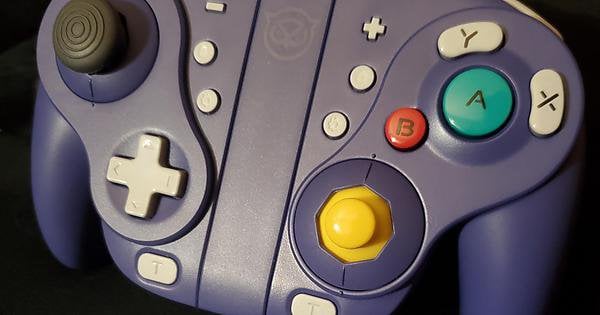
Just wanted to post my thoughts on the new NYXI Wizard controller as I’ve tried various GameCube styled controllers.
Background:
I’ve tried or owned:
-the Original Nintendo GameCube Controller
-Nintendo GameCube Wavebird
-PDP Wired Fight Pad Pro
-PowerA Wireless GameCube Style Controller
-Phob 1.x and 2.x
I’ve done lots of work with the original controllers as a modder within the gamecube controller/smash community.
Initial Impressions:
The Wizard does feel a tad cheap in terms of the plastic. Also a bit light.
Not a huge fan of the sticks… but I have made adjustments to mine for a more familiar feel:
https://imgur.io/a/dJMYf0x
The Interchangeable gates are a really cool feature and made changing the sticks a breeze. No need to open up the entire controller.
The triggers are nice and clicky. My only fear is maybe pressing them too hard and breaking them.. time will tell I suppose.
Buttons are smoothed faced (no depressions for the A, B, X, Y, lettering), so they do feel nice.
Being able to attached them to the switch into handheld mode is also another excellent feature.
Play test:
I will mostly be using this controller to play smash bros on the go or when I want to play wirelessly.
In competitive play, snapback is still present or perhaps noticeable in some characters. This may be an issue of the Analog stick which seems to be taller and wider than the original. Snapback is a big no-no for smash…
Some movement inputs with the analog don’t feel as smooth as a Phob for example, but so far not terrible…
Turbo functionality will make this controller banned from competitive smash events. It did work well and was easy to setup.
Macros were pretty straight forward to setup. This could be a useful tool in training mode. The option to remap buttons to the back buttons is also a neat feature to have.
Triggers feel awesome and responsive. Love the clicky feel as well.
Overall, the NYXI Wizard is a pretty good controller packed with a bunch of awesome features. I think if there is a solution to snapback (either swapping the analog stick or other fix) this controller would be beyond great. For competitive gaming (smash mainly), I would still be grabbing a phob or original GameCube Controller. Casual gamers, I would definitely pick this up. I think the closest we’ve had to a wireless controller that felt like the original was the PowerA controllers but unfortunately, they suffer from Drift after X amount of use 🙁
tldr; NYXI Wizard is a great controller packed with some cool features. Definite pick up for casual gamers. Would be great for competitive gamers if it didn’t suffer from snapback.
What did everyone else think?
by b2u
15 Comments
Please post this on /r/smashbros and /r/ssbm as well if you haven’t.
Shame about the snapback, dealbreaker for me.
What are your thoughts on Phob 2.x?
I bought two, so I have some quality comparison between units.
I can confirm there’s some snapback on all analogs, but they are big analogs and feel much more “springy” than the sticks on the joycons for sure. They still feel smooth enough, and give that full sized analog feeling to the Switch.
They did felt a bit too big when slotted into the Switch… I’m used to the joycons so the whole things looks huge. I may get used to it eventually, but would definitely require a new carry case and there’s no way this fits into mine (and it’s not one of the smaller ones).
I’m not sure if the plastic seems cheap of if it’s the color combination that looks cheap. It seems sturdy enough, but the texture doesn’t really scream “luxury finishing”. It’s the same with the analogs, and their texture – it’s rubbery but barely, it has a rough texture but not really that grippy. The edges where the plastic parts meet could be better finished on some places, but this is not really that important.
Comparing the two units, I noticed that some buttons have a different feel to them. I have an L button that it just not as clicky and has a lower travel distance. I also have an FR (right back button) that’s a bit mushy, and all other 3 back buttons are equally clicky.
I weighed the Wizard assembled (left+right+middle piece) to 253g (grams).
In comparison, a Gulikit Kingkong 2 Pro is 223g.
An Xbox Series X (without bateries), is 241g.
Perhaps it looks too big for the weight so it looks lighter than it is.
So far, I have no serious issues and also recommend it, especially because it has those magnetic analog sensors, drift free, that feel quite robust.
Edit: I also liked how all the analogs were perfectly calibrated out of the box, which makes me think these are good quality sensors.
Sorry, unless I missed it why include a line about the sticks in the title if you just skim over them in the actual review?
Please include info on those lol
No offense to OP in the slightest, but I tried to post a pic of the Wizard attached to the Switch compared to a Switch with standard joy-cons attached. I haven’t seen anyone post a shot like that, so I tried. But the post was removed because it was “low effort” and “we’ve already had pics about this on the sub”.
OPs post is helpful because it comes from the standpoint of a SSB modder, which is valuable info for anyone who’s looking for a solid SSB experience with a GC-style controller. So I’m definitely not shitting on this post.
[Heres the comparison for anyone playing in handheld mode.](https://i.imgur.com/zVK51vX.jpg)
As for the controller itself, I cancelled my original order after reading mushy button comments on the sub, but ended up uncancelling it and received it last Sunday. I agree with everything OP said. It’s a nice controller with a few small issues, but overall worth buying if you have the cash to drop on it.
I’ve enjoyed mine. If the button layout works, doesn’t require HD rumble, and isn’t a motion game (like Fitness Boxing), I’ll likely be using it. The bigger buttons and D-pad alone give my poor thumbs relief and make it much easier to hit L/R. It can even wake the console on its own.
For anyone looking for an alternative that actually feels premium, try the Retroflag controller. The Nyxi was a disappointment tbh, such a cheap-feeling device…
Still waiting for mine to be shipped.
Ordered back on Jan 16th.
I’ve enjoyed it. But it is useless for Smash because the A button is recessed too far, and you can’t rapidly tap A in succession
Ive had mine for a couple days. I bought it mostly for smash on the go. So far I’m getting used to the larger controller size. I’ve also experienced random controller disconnects while playing smash with the screen attached. This has never happened before with my original joy cons.
I really like mine and have been playing on my PC with them. My only complaint is the right stick seems too tall which seems like a nitpick but I always remember the little C stick on the GameCube sitting lower which felt nice
I’ve been using these for about a week now.
Having two units, I was able to do some comparisons and made some videos on the buttons’ quality issues:
Back FR
https://youtu.be/EZcWH5jvhas
Shoulder L
https://youtube.com/shorts/gpUcnOo02Ug
I have emailed NYXI support and will update according to their answer.
I’ve had mine for a while and I’m enjoying it a lot. My major issue was to do with the exposed USB C ports on the bottom of the joycons, but I just bought some cheap protector plugs that do the job. Now all that’s left to do is find a case that’ll fit them when connected to the Switch.
Edit: I also wish the middle section would have had a usb c port for charging, rather than having one on each joycon. Looking at the top of it, there is an odd outlined part that almost looks like it was intended to have a single type c port.
It’s been 7 days since I contacted NYXI support. Zero response so far, not even email acknowledgement.
I currently have both attached to the Switch itself, but my console will go between thinking the right controller is attached and unattached for whatever reason and will “snap” frequently as if I had just placed the right one in. This is despite both joy-cons being firmly placed on the railing.
I have tried following these two Nintendo Support articles:
[Joy-Con Repeatedly Connects/Disconnects From the Console](https://en-americas-support.nintendo.com/app/answers/detail/a_id/26324/~/joy-con-repeatedly-connects%2Fdisconnects-from-the-console#DT:t1-q1a1)
[Joy-Con Not Recognized or Not Registering While Attached to the Console](https://en-americas-support.nintendo.com/app/answers/detail/a_id/22725/session/L2F2LzEvdGltZS8xNjgwNjQ4NjQzL2dlbi8xNjgwNjQ4NjQzL3NpZC9mVWtBJTdFVF9UYVdRdGx3eU1kSHhqTjN2NHdON21GRkZVT0JCYUtLZzNYN096dXpqZUlvSWFBbTh3RlFRMWFjU08wajRkT0NRT3QzbTc4Y1djRmtHSUtXQk0wazdfbUNqQjlMX2NJMnZ5SW95S1M3YWVzY09lWkFsUSUyMSUyMQ%3D%3D)
and those instructions did not work.
I have read the provided manual multiple times trying to see if there was a solution and even searched all over NYXI’s website but have not found a solution.
I was wondering if anyone else had this problem and/or had a solution to fix it.
TL;DR: I got the Wizard Joy-Cons and attached them to my console. Despite the joy-cons firm attachment, the console will go between thinking the right controller is attached and then not, making it hard to use. If you have a solution it would be appreciated!
Update on XYXI support:
Emailed them on the 23rd of March
Noticed them on Twitter telling another user to send them a DM on their problem on the 4th of April, so I did the same and sent them a DM
Also noticed the website/domain is changing from NYXIgaming to NYXIgame
Re-sent the email to the new domain – got an auto-response
Got a reply on Twitter on the 6th of April asking for my order number and email
Received a reply on the email from the previous domain (support@nyxigaming.com), asking for additional videos showing the Switch’s input test screen.
Replied today (7th), with the following videos:
[https://youtube.com/shorts/sREHlzy0FX8](https://youtube.com/shorts/sREHlzy0FX8)
[https://youtube.com/shorts/rb17GIFT9yQ](https://youtube.com/shorts/rb17GIFT9yQ?feature=share)